
ConnectX-7 QSFP112 DAC Cable: 0.5m 400G Passive DAC, $159
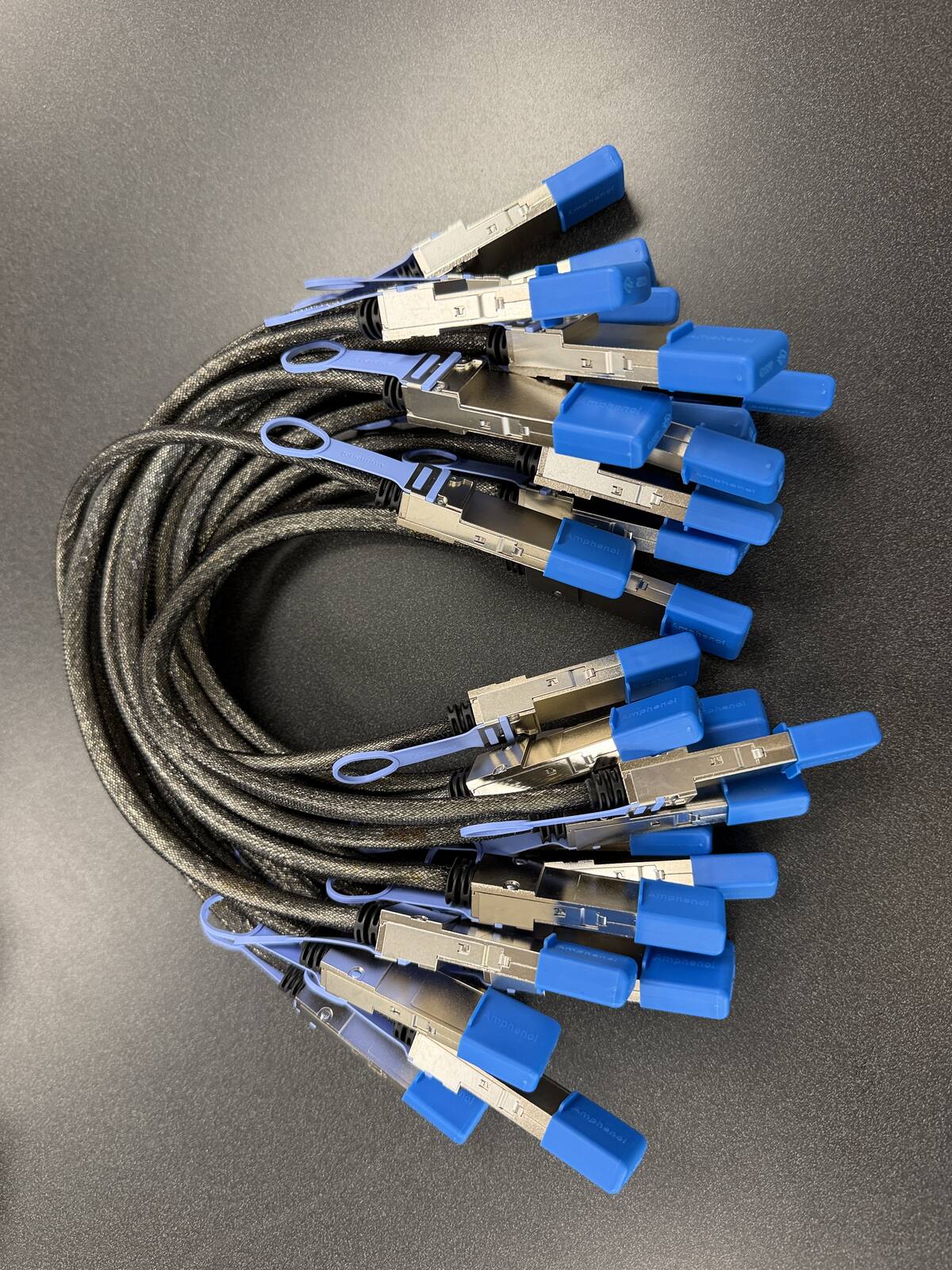
This is the ConnectX-7 QSFP112 DAC cable: a 0.5m 400G passive DAC, Amphenol NJAAKR-0006, that links any two ConnectX-7 QSFP112 ports: two DGX Spark or GB10 workstations back-to-back, two ConnectX-7 adapter cards, or a ConnectX-7 NIC to a nearby 400G switch port. In stock at petronellatech.com for $159 with free US shipping, shipping in 1 to 3 business days.
Outside the US? Checkout ships to US addresses only. Request a quote and we will reply with shipping options.
Read the Cable FAQA 0.5m QSFP112 400G passive DAC is the shortest, cheapest path between any two ConnectX-7 QSFP112 ports. Plug one end into each machine and the link comes up, no switch and no transceivers involved. That is the same part NVIDIA approves for clustering DGX Spark and every other GB10 workstation (the Amphenol NJAAKK0006 / Luxshare LMTQF022-SD-R spec), and it is the same part to use when a ConnectX-7 NIC needs to reach a matching port across a desk or a short rack bay. Petronella Technology Group, Inc. sells it at $159 with free US shipping, in stock, shipping in 1 to 3 business days. Prices and stock at other sellers change week to week, so compare ship dates as well as prices before you order.
Why buy this cable here instead of a generic compatible cable?
Is it a genuine Amphenol part? Yes. Each cable is factory sealed and jacket-stamped Amphenol AHSP P/N NJAAKR-0006, a 0.5m QSFP112 400G passive DAC built to the same NVIDIA Spark Stacking spec as the NJAAKK0006 / LMTQF022-SD-R references (not the same part number). The bag label is visible in the photos below.
Has it been tested in a real cluster? We measured 196 Gb/s across a single 0.5m cable in our own GB10 cluster work, and the results are public in our free GB10 cluster guide on GitHub.
How fast does it arrive, and what if I change my mind? It is in stock in the US and ships in 1 to 3 business days with free US shipping. You can cancel any time before it ships for a refund less the payment processing fee (see our terms).
The exact cable your ConnectX-7 ports need
| Cable | 0.5m QSFP112 400G passive direct-attach copper (DAC) |
| Part number | Amphenol NJAAKR-0006, 30 AWG, jacket-stamped AHSP P/N NJAAKR-0006 |
| Approved spec | Built to the Amphenol NJAAKK0006 / Luxshare LMTQF022-SD-R spec named in NVIDIA's Spark Stacking documentation |
| Fits | Any QSFP112 400G or 200G port: both QSFP112 ports on a ConnectX-7 NIC, including the ConnectX-7 in every GB10 workstation, and matching QSFP112 switch ports |
| Link rate | 400G-rated copper; GB10 ConnectX-7 ports negotiate at about 200 Gb/s per port, so the rating is headroom |
| For two units | One cable, port to port, no switch |
| For a three-node ring | Three cables (switchless, each unit uses both ports) |
| Transceivers | None needed. The connector ends of a passive DAC are the transceivers. |
| Power draw | Passive copper: no electronics in the data path, no firmware, nothing to configure |
| Price | $159, free US shipping (in stock, ships in 1 to 3 business days) |
| Multipacks | 2-pack $299, 3-pack ring kit $435, free US shipping, US addresses only |
| Returns | Cancel free before it ships; after delivery, RMA within 30 days (15% restocking fee and $20 return shipping and handling fee) |
One ConnectX-7 QSFP112 DAC cable, any two ConnectX-7 QSFP112 ports
The GB10 workstations made this cable famous, but the cable itself does not know what it is plugged into. A passive DAC is a copper assembly with a QSFP112 connector on each end and nothing else: no chips, no firmware, no configuration. That makes it the standard answer wherever two QSFP112 ports sit within reach of each other, and there are three situations where that comes up.
Two GB10-class workstations, back to back. This is the case NVIDIA documents, and the reason we stock the part. The DGX Spark Founders Edition and every OEM GB10 build (Dell Pro Max GB10, ASUS Ascent GX10, HP ZGX Nano, Lenovo ThinkStation PGX, MSI EdgeXpert, Gigabyte AI TOP ATOM, Acer Veriton GN100) carries a ConnectX-7 SmartNIC with two QSFP112 ports. One cable links two units and a three-unit ring takes three. Our DGX Spark and GB10 cluster cable hub walks that through end to end, and each of our OEM cable pages shows where the ports sit on that specific chassis.
Two ConnectX-7 adapter cards, card to card. NVIDIA's ConnectX-7 documentation describes dual-port QSFP112 adapter cards that support 400/200/100GbE on Ethernet-only cards, and lists passive copper cable with ESD protection among the card's supported connectivity. Two machines, each with a dual-port QSFP112 ConnectX-7 card, can be linked directly with this same cable over a short distance, giving you an RDMA-capable private link without a switch in between. Set an IP address on each end and the link is a network.
A ConnectX-7 NIC to a nearby switch port. The same assembly reaches a QSFP112 port on a 400G or 200G switch when the switch sits within half a meter, which in practice means the switch is in the same rack bay as the server or the same shelf bay as the workstation. For those short runs, a passive DAC beats optics on price, latency, and power, and there is nothing to fail except the copper itself.
What the cable will not do is negotiate a QSFP112 link into a QSFP56 or QSFP28 port, or span the room. Those limits are physical, and the two sections below explain each one so you can order the right part the first time.
What a passive DAC actually is
A direct-attach copper cable is a twinax assembly: two, in this case four-lane, sets of shielded copper pairs bonded permanently to their connectors at the factory. Because the connectors are the transceivers, there are no separate optics to buy, nothing to clean, and nothing to misconfigure. NVIDIA's ConnectX-7 documentation lists passive copper cable with ESD protection among the card's connectivity options, and the adapter includes circuits specifically to protect the card and server from static shocks when copper cables are plugged. The trade is reach: copper at 400G-class signaling attenuates fast, which is why passive DACs come in short lengths and why the 0.5m build is the most common.
Ours is built on 30 AWG conductors. That gauge is thin enough to dress a gentle loop beside a desktop chassis and stiff enough to hold its shape once routed. The jacket is stamped with the Amphenol part number, and the bag it ships in is factory sealed. There is no firmware in a passive cable, so there is nothing to update, nothing to break, and no vendor lock-in behavior to worry about: the link negotiates or it does not, and if it does not, the fix is almost always reseating or a wrong-port mistake rather than the cable.
The parts we ship are the Amphenol NJAAKR-0006, a 0.5m QSFP112 400G passive DAC built to the same NVIDIA-approved specification that NVIDIA's Spark Stacking documentation names (the Amphenol NJAAKK0006 / Luxshare LMTQF022-SD-R references). It is not the same part number as any of those references, and we keep the distinction explicit everywhere on this page and in our part-number explainer. If a listing elsewhere claims to be the NJAAKK-N911, compare the jacket stamp before you buy.
QSFP112 vs QSFP56 vs QSFP28
The three connectors look almost identical from the front, which is exactly why the alphabet soup trips people up. All three are four-lane cages in the same physical family; what changes between generations is how fast each lane runs. NVIDIA's LinkX cable documentation groups its 400G QSFP112 cables under 100G PAM4 modulation, its 200G QSFP56 cables under 50G PAM4, and its QSFP28 parts under 25G NRZ, and those four-lane products are what produce the 100G, 200G, and 400G classes.
| Form factor | Signaling per lane | 4-lane class | Where you meet it |
|---|---|---|---|
| QSFP28 | 25G NRZ | 100G | Older 100G NICs and switches; 100GbE DACs such as NVIDIA's MCP1600 family |
| QSFP56 | 50G PAM4 | 200G | HDR InfiniBand and 200GbE; NVIDIA's MCP1650 DACs, and the Amphenol NJAAKK-N911 that retailers list for DGX Spark |
| QSFP112 | 100G PAM4 | 400G | NDR InfiniBand and 400GbE; the ConnectX-7 QSFP112 ports on GB10 workstations and modern 400G switches |
The ConnectX-7 in every GB10 workstation exposes its two ports through QSFP112 cages, and those ports negotiate at about 200 Gb/s each on a node-to-node link, so a 400G-rated QSFP112 DAC carries them with headroom to spare. NVIDIA's ConnectX-7 documentation likewise lists 400/200/100GbE operation for the dual-port QSFP112 Ethernet cards, which is the same reason one cable serves both 400G and 200G links. A QSFP56 cable is a different part: its signaling is half the rate, and while community testing has shown 200G QSFP56 DACs linking on GB10 pairs, NVIDIA's Spark Stacking documentation specifies the QSFP112 400G DAC, so that is the part guaranteed against the documented spec. Next to a pair of $4,000 workstations, the specified part is the safe choice. The hub page has the full QSFP56 versus QSFP112 discussion if you are weighing a bargain alternative.
How long can a 400G passive DAC be?
Passive copper at 100G PAM4 signaling is a short-reach medium, and the honest answer is: the shorter the better. NVIDIA's LinkX cable documentation rates passive copper at up to about 3 meters for 400G-class links, with the longest standard builds aimed at switch-to-switch runs inside a single rack. Thinner 30 AWG cables like this one hold their signal margin best well inside that envelope, which is why 0.5m and 1m builds are the volume parts and why we stock the 0.5m.
Practically, plan the run before you order. The numbers below come from the placements we see most often, and they assume the direct port-to-port path rather than the stretched distance across a room.
| Placement | Approximate port-to-port run | 0.5m cable verdict |
|---|---|---|
| Two systems stacked or side by side on a desk | Well under 0.5m | Yes, with 30 to 40cm to dress into a loop |
| Two units across a monitor stand | About 1m | Tight. Often workable if the loop can run behind the monitor; measure first |
| Two units on adjacent shelves | About 2m | Borderline. Inside the passive envelope in principle, but dress and gauge thickness matter; ask us before ordering |
| Different rack bays or a rack-to-desk run | 3m and beyond | No. This is active copper or optics territory; request a quote instead |
If your two ports are farther apart than the table's comfort zone, the answer is not a longer passive cable; it is a different part, an active copper cable (ACC) for a few meters or an AOC/optics pair for longer spans, and it needs to match the ports on both ends. Measure the actual port-to-port path, including the drop behind the desk or the vertical run up the rack, and send it through the cable quote form on our hub page or call 919-348-4912. An engineer will spec the right medium before you spend money on the wrong one.
Compatibility: what to confirm before you order for a non-GB10 system
Every GB10 workstation takes this cable, full stop: the ConnectX-7 NIC, its two QSFP112 ports, and DGX OS are identical across the DGX Spark Founders Edition and all seven OEM builds, so there is nothing to verify. If your ConnectX-7 ports live somewhere else, in a rack server or a PCIe add-in card, the cable is still a standard QSFP112 passive DAC, and the same three checks apply. NVIDIA's own documentation is the source for each of them.
First, confirm the port form factor is QSFP112. ConnectX-7 shipped in several port styles: dual-port QSFP112 cards, single-port OSFP cards, and quad-port SFP56 cards, and only the QSFP112 ports accept this cable. NVIDIA's ConnectX-7 user manual lists the dual-port QSFP112 OPNs (the MCX755106 family among them) and states that dual-port QSFP112 Ethernet-only cards support 400/200/100GbE. The manual also covers InfiniBand-and-Ethernet QSFP112 cards at NDR200 200Gb/s. If your card is one of those dual-port QSFP112 parts, the connector is a match.
Second, confirm the far end accepts a QSFP112 passive DAC. A 400G link needs both ends to speak 100G PAM4 over the same lanes. A 400G QSFP112 switch port is the designed partner; a 200G port mode works too, negotiating down the way GB10 ports do. What will not work is a QSFP56 or QSFP28 cage at the other end: the connector opening may look similar, but the signaling generations do not match, and a passive cable cannot translate. Check the switch or adapter specification for QSFP112 DAC support rather than assuming cage compatibility.
Third, confirm the length class fits your run. NVIDIA maintains a validated cables list for ConnectX-7 in its firmware release notes, and the passive copper entries there cluster at 0.5m to 3m, consistent with the LinkX reach figures above. For a desk-side or same-bay link, this 0.5m build is squarely in class. For longer spans, ask us rather than gambling on a longer passive part.
We will not claim compatibility with specific servers or switches we have not tested, so this page does not name any. What we can say is what the connector standard and NVIDIA's ConnectX-7 documentation support: a QSFP112 400G passive DAC links two QSFP112 ports rated for passive copper at 400G or 200G class, and on GB10 systems we have measured exactly that. If you send us your adapter model and far-end port through the quote form, we will tell you straight whether this part fits before you order.
Measured, not assumed: what this cable does in a GB10 cluster
We stock this cable because we use it. Our own GB10 cluster, documented publicly in our free GB10 cluster guide on GitHub, is cabled with this exact part, and the numbers below are our measurements rather than brochure figures.
A single 0.5m cable between two GB10 units measured 111.86 Gb/s with iperf3 running across one ConnectX-7 port on each unit. Using both ports of each unit pushed the same link to 196.08 Gb/s, which is the practical ceiling of a port pair negotiating at about 200 Gb/s each. Those numbers matter for expectations: each GB10 reads its own unified memory at 273 GB/s, while the link between two units carries roughly 25 GB/s, so clustering two GB10 machines is a capacity play that lets a model too large for one 128 GB node span both, not a speed play for a model that already fits. Our explainer on what 400G really means for DGX Spark cluster bandwidth walks through the arithmetic, and the on-fleet LLM benchmarks show what the clustered setup actually runs.
The same measurement discipline applies to any two QSFP112 ports this cable joins. Because the cable is passive, it contributes nothing to the conversation: no negotiation tricks, no firmware personalities, no vendor-specific tuning. Whatever the two ports negotiate, the copper carries. That is also why our first troubleshooting step on any GB10 link is always physical: reseat both ends until they click, confirm both ends are in the same-numbered port, and only then look at software.
Topologies: one link, a ring of three, or a switch at four and up
Two units need one cable. Plug it into a QSFP112 port on each machine, matching the port number on both ends, and the link is up. On GB10 systems the two ports are not interchangeable in NVIDIA's playbooks, so our hub page maps port 0 and port 1 on each chassis before you cable anything.
Three units form a switchless ring with three cables, following NVIDIA's ring playbook: node 1 port 0 to node 2 port 1, node 2 port 0 to node 3 port 1, and node 3 port 0 back to node 1 port 1. Each unit ends up with one cable in each of its two ports, and the 3-pack ring kit ($435) is exactly those three cables.
Four or more units change the topology. Each ConnectX-7 exposes only two QSFP112 ports, so a fourth node cannot be cabled directly to all three others. On GB10 systems, NVIDIA's October 22, 2026 eight-node results ran four units as a switchless ring of four cables for tensor-parallel inference; for eight nodes, a split cluster, or any-to-any traffic, the design moves to a QSFP switch, with one cable from each node to the switch and a switch port for every node. If that is your build, send the node count through the cluster build quote form or call 919-348-4912 and an engineer will map the ports, cables, and switch with you before you commit to any of it. For the full walkthroughs of two-node and ring bring-up, see what cable connects two DGX Sparks and how a two-Spark cluster scales to a switched fabric.
Bringing the link up on DGX OS
On a GB10 pair, the cable is the hardware half; the software half is a small netplan file that assigns addresses to the cabled interfaces. NVIDIA publishes the file for the two-node playbook, and it is the same file our OEM pages reference:
sudo wget -O /etc/netplan/40-cx7.yaml https://github.com/NVIDIA/dgx-spark-playbooks/raw/main/nvidia/connect-two-sparks/assets/cx7-netplan.yaml
sudo chmod 600 /etc/netplan/40-cx7.yaml
sudo netplan apply
After it applies, confirm the cabled port is up and read its negotiated rate:
ibdev2netdev
ip link show enp1s0f1np1
sudo ethtool enp1s0f1np1 | grep -i speed
Each physical QSFP port appears in DGX OS as two logical interfaces because the ConnectX-7 presents two PCIe halves; port 0 is enp1s0f0np0 (twin enP2p1s0f0np0) and port 1 is enp1s0f1np1 (twin enP2p1s0f1np1). Use the same physical port on both machines; NVIDIA's playbook README is explicit that mismatched ports are why NCCL tests misbehave. On a healthy GB10 link, ethtool reports a 200 Gb/s class figure and real throughput lands around 185 to 196 Gb/s. If the link stays down, reseat both ends until they click before suspecting anything else; a passive DAC either links or it does not. The complete two-node walkthrough, including verification steps, is in our two-Spark cabling guide, and per-chassis port locations are on each OEM cable page.
Choosing single, 2-pack, or 3-pack
Single cable, $159. One link between two ConnectX-7 QSFP112 ports: the two-workstation cluster, the card-to-card private link, or the short NIC-to-switch run. This is the right order when you know exactly which two ports you are joining. 2-pack, $299 ($149.50 per cable, save $19). Two separate links, or one link plus a spare on the shelf. Some two-node owners also run a second cable between the remaining ports of the same pair to double the pipe, which the cluster cable hub covers in detail. 3-pack ring kit, $435 ($145 per cable, save $42). Three units in NVIDIA's ring topology, all three links in one order. This is the most common multipack we quote for GB10 clusters.
Every cable ships factory sealed in Amphenol packaging, jacket-stamped AHSP P/N NJAAKR-0006, built to the NVIDIA-approved Amphenol NJAAKK0006 / Luxshare LMTQF022-SD-R spec. There are no transceivers or optics to buy separately. Orders are in stock and ship in 1 to 3 business days with free shipping to US addresses, and you receive a tracking number by email when the cable ships. We ship only to US addresses at the free rate; outside the US, call 919-348-4912 or use our contact page for a shipping quote before you order. Returns: cancel any time before the cable ships for a refund less the payment processing fee. Once it has shipped, a return needs an RMA within 30 days, you pay return shipping and handling, and the refund is the purchase price less a 15% restocking fee and a flat $20 return shipping and handling fee. Cables that have been cut, modified, bent past their minimum bend radius, or installed are not returnable.
Need more than one pack? Use the Order button and set the quantity on the checkout form, up to 10 of any pack (two 3-packs = six cables). Need a PO or invoice for 5+ cables? Send the quantity and ship-to address through our cable quote form or call (919) 348-4912, and we send a Stripe invoice for your PO. Payment is due in full before the cables ship.
Outside the US? Checkout ships to US addresses only. Request a quote and we will reply with shipping options.
If you are also weighing which GB10 machine to buy, or a larger system for the jobs a desk-side cluster cannot hold, our hardware overview covers the platforms we deploy, from NVIDIA DGX Spark desktops to full DGX systems. And if you need a second opinion on the link design itself, the benchmark results from our own GB10 and larger clusters show what these interconnects actually deliver under load.
ConnectX-7 QSFP112 DAC cable FAQ
What does the ConnectX-7 QSFP112 DAC cable connect?
Will this cable work in systems other than GB10 workstations?
Is a QSFP112 cable the same as QSFP56 or QSFP28?
How long can a 400G QSFP112 passive DAC be?
What cable do I need to connect two DGX Spark or GB10 units?
What speed will the link actually run at?
How many cables do I need for a three-node ring?
Is this the NVIDIA NJAAKK-N911 cable?
Is the cable in stock, and how fast does it ship?
What if I need to cancel or return my order?
Sources
- NVIDIA ConnectX-7 Adapter Cards User Manual, Introduction (dual-port QSFP112 card rates 400/200/100GbE; passive copper cable with ESD protection): https://networking-docs.nvidia.com/connectx7hw/introduction.md
- NVIDIA ConnectX-7 Adapter Cards User Manual, Supported Interfaces (dual-port QSFP112 OPNs, networking connectors accept passive cable interconnects, ESD protection circuits): https://networking-docs.nvidia.com/connectx7hw/supported-interfaces
- NVIDIA ConnectX-7 Firmware Release Notes, Validated and Supported Cables and Switches (Amphenol NJAAKK-N911 200G DAC listed; passive copper lengths 0.5m to 3m): https://networking-docs.nvidia.com/connectx7fwrn/28.50.1002/validated-and-supported-cables-and-switches
- NVIDIA/Mellanox LinkX Cables and Transceivers Configuration Map (400G QSFP112 family on 100G PAM4; passive copper up to 3 meters): https://content.mellanox.com/LinkX/LinkX_Configuration_Maps.pdf
- NVIDIA Ethernet Network Adapters overview (ConnectX-7 200/400G NIC positioning): https://www.nvidia.com/en-us/networking/ethernet-adapters/
- NVIDIA DGX Spark: Spark Stacking (approved cable spec, port identification, interface names): https://docs.nvidia.com/dgx/dgx-spark/spark-clustering.html
- Petronella Technology Group GB10 cluster guide, public measurements (111.86 Gb/s single port, 196.08 Gb/s both ports): https://github.com/capetron/gb10-cluster-guide