
HP ZGX Nano Cluster Cable: 0.5m QSFP112 400G DAC
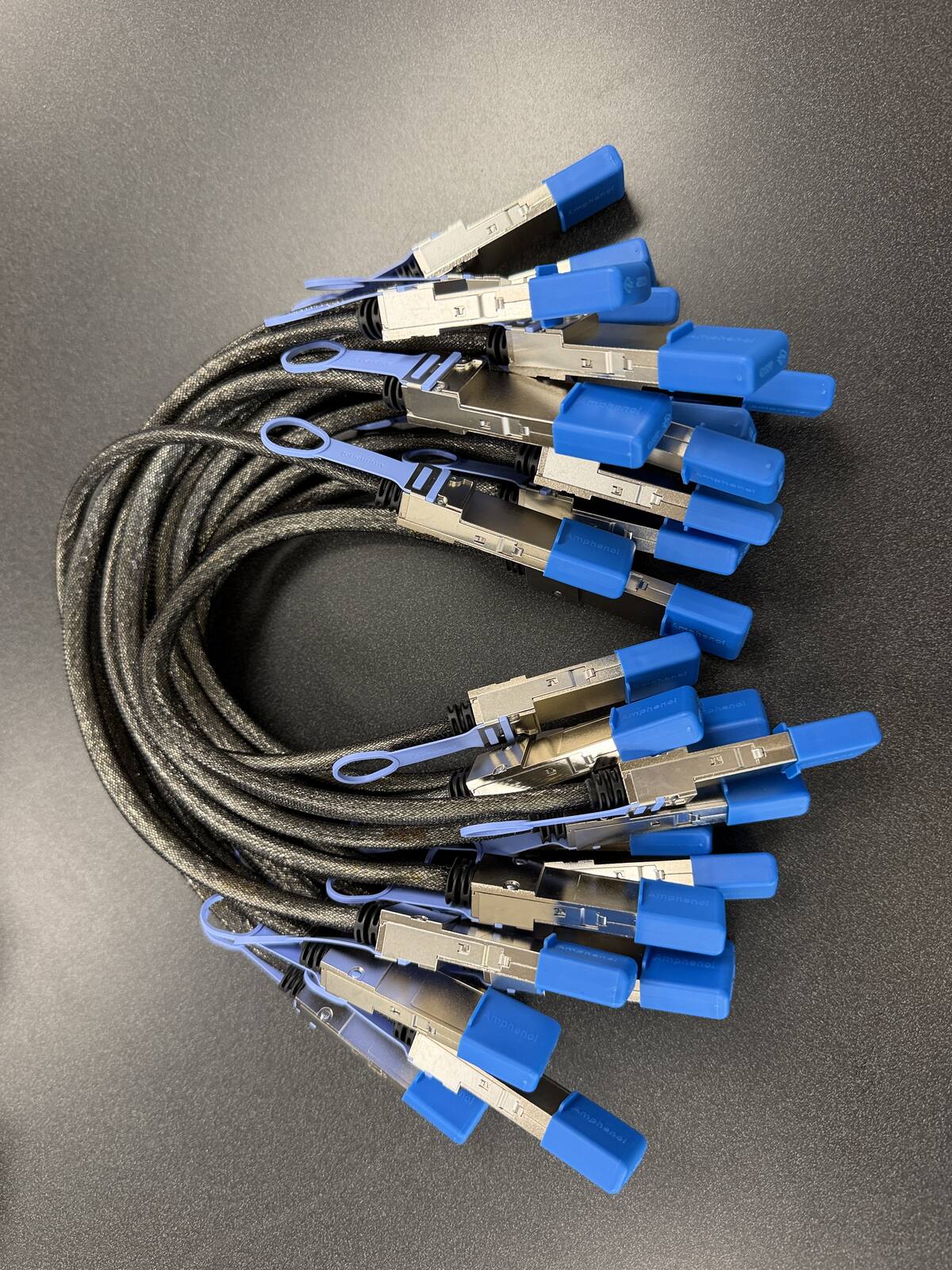
The HP ZGX Nano cluster cable is a 0.5m QSFP112 400G passive DAC, Amphenol NJAAKR-0006, in stock at petronellatech.com for $159 with free US shipping, shipping in 1 to 3 business days. The ZGX Nano shares the DGX Spark GB10 platform and ConnectX-7 ports, so one cable links two units and a three-unit ring needs three.
Outside the US? Checkout ships to US addresses only. Request a quote and we will reply with shipping options.
Read the Cable FAQTo cluster two HP ZGX Nano G1n AI Station nodes you need one 0.5m QSFP112 400G passive DAC cable in the QSFP112 port on each unit. HP's ZGX Nano is a secure, desk-side build of NVIDIA's GB10 Grace Blackwell platform, and it carries the same ConnectX-7 NIC as the DGX Spark, so it takes the exact cable NVIDIA approves in its Spark Stacking documentation (Amphenol NJAAKK0006 / Luxshare LMTQF022-SD-R spec). Petronella Technology Group, Inc. sells it at $159 with free US shipping, in stock, shipping in 1 to 3 business days. Prices and stock at other sellers change week to week, so compare ship dates as well as prices before you order.
Why buy this cable here instead of a generic compatible cable?
Is it a genuine Amphenol part? Yes. Each cable is factory sealed and jacket-stamped Amphenol AHSP P/N NJAAKR-0006, a 0.5m QSFP112 400G passive DAC built to the same NVIDIA Spark Stacking spec as the NJAAKK0006 / LMTQF022-SD-R references (not the same part number). The bag label is visible in the photos below.
Has it been tested in a GB10 cluster? We measured 196 Gb/s across a single 0.5m cable in our own GB10 cluster work, and the results are public in our free GB10 cluster guide on GitHub.
How fast does it arrive, and what if I change my mind? It is in stock in the US and ships in 1 to 3 business days with free US shipping. You can cancel any time before it ships for a refund less the payment processing fee (see our terms).
HP positions the ZGX Nano G1n as a secure, sustainable desk-side AI node, wrapping the GB10 platform in a chassis built largely from recycled aluminum and steel and aiming it at business teams that want a supercomputer-class model host next to the desk rather than in a data center. Those same teams tend to buy in pairs so a workload can span two boxes, and clustering them takes exactly one part that HP does not put in the carton. The ZGX Nano exposes NVIDIA's GB10 clustering over two QSFP112 ports on its onboard ConnectX-7 NIC.
| Cable | 0.5m QSFP112 400G passive direct-attach copper (DAC) |
| Approved spec | Amphenol NJAAKK0006 / Luxshare LMTQF022-SD-R (NVIDIA Spark Stacking docs) |
| Fits | Both QSFP112 ports on the HP ZGX Nano G1n ConnectX-7 NIC |
| Platform | NVIDIA GB10 Grace Blackwell, 128 GB LPDDR5x unified memory, 273 GB/s |
| Port location | Rear panel, right of the RJ-45 10GbE jack; left QSFP = Port0, right QSFP = Port1 (HP QuickSpecs) |
| ZGX Nano OS image | NVIDIA DGX OS 7 / Ubuntu 24.04 (standard NVIDIA clustering stack) |
| For two ZGX Nano units | One cable |
| For a three-node ring | Three cables (switchless, each box uses both ports) |
| Price | $159, free US shipping (in stock, ships in 1 to 3 business days) |
| Multipacks | 2-pack $299, 3-pack ring kit $435 (the three cables a switchless three-node ring needs), free US shipping, US addresses only |
| Works with | NVIDIA DGX Spark, Dell Pro Max GB10, ASUS Ascent GX10, HP ZGX Nano, Lenovo ThinkStation PGX, MSI EdgeXpert, Gigabyte AI TOP ATOM, Acer Veriton GN100; brands can be mixed in one cluster |
| Returns | Cancel free before it ships; after delivery, RMA within 30 days (15% restocking fee and $20 return shipping and handling fee) |
Where the two QSFP112 ports sit on the HP ZGX Nano G1n
Every connector on the ZGX Nano G1n is on the rear panel. HP's QuickSpecs (c09212373, version 5, April 2, 2026) number the rear view left to right: the power button, the single USB Type-C power connector for the 240W adapter, three USB 3.2 Type-C 20Gbps ports that also carry DisplayPort 1.4a Alt mode, one HDMI 2.1a output, one RJ-45 10GbE jack, and finally the pair of QSFP ports for the ConnectX-7 200GbE controller. HP labels the left QSFP port Port0 and the right one Port1. NVIDIA's three-node playbook describes Port0 as the ConnectX-7 port next to the Ethernet jack, and on the Nano that is exactly where it lands.
The ZGX Nano is a 15 cm by 15 cm square footprint, 5.1 cm tall without its feet, and starts at 1.25 kg. That matters for cable dressing because a 0.5m DAC between two Nanos placed side by side, rear panels facing the same way, leaves a generous open loop. The NVIDIA-approved reference cables are 30 to 32 AWG passive copper, which is stiffer than a patch cord. Keep the loop open and round, never fold the cable to tidy it, and do not let the connector body hang its own weight off the QSFP112 cage. A cable bent past the manufacturer's minimum bend radius is not returnable, and more to the point it will drop the link or negotiate below 200G.
Stacking two Nanos on top of each other is tempting because the chassis is flat and square, but HP's QuickSpecs specify an operating range of 5 to 30 degrees C and the unit breathes through its own housing, so leave air around each box rather than sandwiching them. Side by side with a few centimeters between them is the layout we recommend; the 0.5m cable reaches with room to spare, and both power adapters stay on the same side. HP's QuickSpecs also state the ZGX Nano is neither supported nor qualified for rack mounting, so plan a shelf or a desk, not a 1U tray. For a three-node ring, arrange the three units in a row or a shallow arc so each cable runs to an adjacent neighbor without crossing the middle unit's power lead.
HP ZGX Nano G1n shipping configurations, and what differs from the DGX Spark Founders Edition
HP ships the ZGX Nano G1n in a narrow set of configurations, and the parts that matter for clustering are fixed across all of them. The table below is taken from HP's QuickSpecs and datasheet, with the NVIDIA DGX Spark Founders Edition figures from NVIDIA's own product page for comparison.
| Item | HP ZGX Nano G1n | DGX Spark Founders Edition | Matters for clustering? |
|---|---|---|---|
| Superchip | NVIDIA GB10 Grace Blackwell, 20-core Arm CPU (10 Cortex-X925 + 10 Cortex-A725) | Same GB10 | No, identical |
| Unified memory | 128 GB LPDDR5x, 16 channels, soldered, 273 GB/s | 128 GB LPDDR5x, 273 GB/s | No, identical |
| Cluster NIC | NVIDIA ConnectX-7 200GbE controller, 2x QSFP | ConnectX-7, 200 Gbps | No, identical, same cable |
| Storage | 2 TB or 4 TB PCIe Gen4 x4 2242 NVMe SED OPAL M.2 (slot is Gen5 x4) | 4 TB NVMe M.2 with self-encryption | No |
| Operating system | NVIDIA DGX OS 7 / Ubuntu 24.04; HP states Windows is not supported | NVIDIA DGX OS | No, same clustering stack |
| Wired LAN | 1x RJ-45 10GbE (Realtek RTL8127-CG) | 1x RJ-45 10GbE | No; management only |
| USB / display | 3x USB-C 20Gbps + 1x USB-C power, 1x HDMI 2.1a | 4x USB-C, 1x HDMI 2.1a | No |
| Wireless | Wi-Fi 7 + Bluetooth 5.4 module; HP datasheet also lists a radio-free variant for restricted environments | Wi-Fi 7, BT 5.4 | No |
| Security | Integrated TPM 2.0, convertible to FIPS 140-2 mode | Not listed on NVIDIA's spec page | No |
| Chassis | 15 x 15 x 5.1 cm, from 1.25 kg; 75% recycled aluminum, 20% recycled steel, 40% post-consumer recycled plastic | 15 x 15 x 5.05 cm, 1.2 kg | No |
| Power | 240W external USB-C adapter (HP warns against third-party adapters) | 240 W | No |
| Warranty | One-year hardware limited warranty in most regions; HP Care Packs optional | See NVIDIA | No |
Read that right-hand column and the pattern is obvious: nothing HP changed touches the interconnect. The ZGX Nano's differences from the Founders Edition are the storage menu (HP offers a 2 TB tier below NVIDIA's 4 TB), the security posture (a TPM that can run in FIPS 140-2 mode and a radio-free option), the recycled-content chassis, HP's warranty and Care Pack channel, and HP's ZGX Toolkit software layer. The GB10, the 128 GB of memory, the 273 GB/s memory bus, and the ConnectX-7 with its two QSFP ports are the same silicon in both boxes.
What HP preinstalls that is relevant to clustering
HP's QuickSpecs list the software image as NVIDIA DGX OS 7 on Ubuntu 24.04 with NVIDIA Connect, CUDA 13, NVIDIA RTX Driver 580, DGX Dashboard, and NVIDIA AI Workbench preinstalled. That is the same DGX OS stack NVIDIA's clustering playbooks assume, so the ConnectX-7 driver, the RDMA tooling, and ibdev2netdev are already present on first boot. HP's ZGX Toolkit is a separate download from hp.com/zgx-onboard; per HP's datasheet it runs on an x86 client with Visual Studio Code and talks to the Nano over the network. It does not replace or change the NVIDIA cluster configuration, so you can use it on top of a clustered pair or ignore it entirely.
If you are still deciding between the Nano and NVIDIA's own box, our DGX Spark Founders Edition overview covers the NVIDIA unit, and the larger NVIDIA DGX systems page covers where a desk-side GB10 stops and a rack system starts.
Setting up a ZGX Nano pair: first boot, link check, MTU and RoCE
Two things on this list are HP-specific and verified against HP's documents: the OS image (DGX OS 7 on Ubuntu 24.04, no Windows option) and the port labels (left Port0, right Port1). Everything else follows NVIDIA's standard DGX Spark clustering guide, linked in the Sources at the end of this page, because HP ships the same NVIDIA software stack rather than its own network layer.
1. First boot on each Nano, before you cable them
Unbox both units, connect each 240W USB-C adapter (HP warns that third-party adapters can cause boot failures or shutdowns, so use the ones in the cartons), attach a display over HDMI or USB-C, and complete the DGX OS first-run setup on each Nano independently: create the same username on both, connect each to your LAN over the RJ-45 or Wi-Fi, and let the DGX Dashboard finish any pending updates. Give each unit a distinct hostname such as nano-1 and nano-2.
2. Seat the cable
Power is fine to leave on; the ConnectX-7 hot-plugs. Push the QSFP112 connector into Port0 on the first Nano until the latch clicks, then into Port0 on the second Nano. NVIDIA's two-node playbook says any QSFP port works, but using the same physical port on both machines keeps the interface names symmetric, which avoids NCCL configuration mismatches later. Pull gently on each connector; if it moves, it is not latched.
3. Verify the ConnectX-7 link and its speed
On either Nano, list the ConnectX-7 devices and their Linux interface names. The port you cabled shows as Up:
ibdev2netdev
ip link show | grep -E "enp1s0|enP2p1s0"
DGX OS exposes each physical QSFP port as two logical interfaces (for example enp1s0f0np0 and enP2p1s0f0np0 for Port0). Confirm the negotiated speed on the Up interface with ethtool; a healthy link reports 200000Mb/s, which is the 2x100G lane pair over PCIe Gen5 x4 that every GB10 box negotiates. ibstat should show the port State as Active and the physical state as LinkUp:
sudo ethtool enp1s0f0np0 | grep -i speed
ibstat
If ethtool reports a lower speed or the link flaps, reseat both ends. A speed of 200000Mb/s with 185 to 190 Gb/s measured throughput is what this cable delivers between GB10 units; it is Ethernet with RoCE, not InfiniBand, so do not expect InfiniBand tooling to show a fabric.
4. Give each end an address
NVIDIA's playbook uses a private subnet per link. The persistent method is a netplan file on each node; the quick method for a test is ip addr. Node 1 takes .10 and node 2 takes .11 on the same interface name:
# node 1 (temporary, for a first test)
sudo ip addr add 192.168.100.10/24 dev enp1s0f0np0
sudo ip link set enp1s0f0np0 up
# node 2
sudo ip addr add 192.168.100.11/24 dev enp1s0f0np0
sudo ip link set enp1s0f0np0 up
# from node 1
ping -c 3 192.168.100.11
For a permanent setup, NVIDIA's guide writes the same addresses into /etc/netplan/40-cx7.yaml with dhcp4: no and applies it with sudo netplan apply. The playbook's discover-sparks script then sets up passwordless SSH between the two nodes; you can also do that by hand with ssh-copy-id in both directions and confirm with ssh 192.168.100.11 hostname.
5. MTU and RoCE basics
The ConnectX-7 supports RoCE (RDMA over Converged Ethernet), which is what lets NCCL move tensors between the two Nanos without bouncing through the CPU. NVIDIA's playbooks leave MTU at the default for the basic two-node setup; if you raise it to a jumbo value such as 9000 for throughput testing, set it identically on both ends of the link (sudo ip link set enp1s0f0np0 mtu 9000) because a mismatch silently fragments RDMA traffic. This is standard ConnectX practice rather than an HP-specific step. With the link up, addressed, and SSH working, NVIDIA's Cluster Assistant or the playbook's NCCL test confirms that both GPUs see each other over the fabric. If you want to see what that bandwidth means in practice before you buy a second Nano, read what 400G really means for a GB10 cluster.
Order the HP ZGX Nano cluster cable
Free US shipping on every option. In stock, ships in 1 to 3 business days.
Need a PO or invoice for 5+ cables? Send the quantity and ship-to address through our cable quote form or call (919) 348-4912, and we send a Stripe invoice for your PO. Payment is due in full before the cables ship.
Outside the US? Checkout ships to US addresses only. Request a quote and we will reply with shipping options.
Mixing an HP ZGX Nano with a DGX Spark or another GB10 workstation
Because HP left the ConnectX-7 and its QSFP ports exactly as NVIDIA designed them, a ZGX Nano is a first-class citizen in any GB10 cluster. The same holds for every other OEM build of the platform: Dell's Pro Max GB10 desktop, the ASUS Ascent GX10, an MSI EdgeXpert, the Lenovo ThinkStation PGX, Acer's Veriton GN100, and the Gigabyte AI TOP ATOM all carry the same NIC and take the same cable. The only practical wrinkle in a mixed pair is that the interface names can differ slightly between vendors' DGX OS images, so run ibdev2netdev on each box rather than assuming the name from the other one.
A mixed three-node ring works the same way: three cables, each Nano or Spark using Port0 toward one neighbor and Port1 toward the other, following NVIDIA's three-node playbook (node 1 Port0 to node 2 Port1, node 2 Port0 to node 3 Port1, node 3 Port0 to node 1 Port1). Storage size, chassis, and warranty channel are irrelevant to the ring; a 2 TB Nano, a 4 TB Nano, and a Founders Edition form a valid ring.
Four or more ZGX Nano units: plan the switch first
With two QSFP ports per unit, three nodes is the ceiling for direct cabling. A fourth Nano needs a 200G-class QSFP switch, and at that point each unit uses one 0.5m DAC to the switch instead of to a neighbor, so the count becomes one cable per node plus spares. The 0.5m length still works if the switch sits on the same shelf; if the switch is in a separate rack, you need longer DACs or optics, which we can quote by phone. Before you commit to a fourth box, look at the LLM benchmark leaderboards to check whether the model you actually want to run needs more than the 384 GB three Nanos already pool, and talk to our AI services team if the answer is a larger DGX class system rather than a fourth desk-side unit.
Which pack fits an HP ZGX Nano buyer
HP aims the ZGX Nano at business teams that want a secure, managed desk-side node rather than a hobbyist box, and that buyer usually orders through an HP reseller in twos or threes with a purchase order. Match the cable pack to the number of Nanos on that order:
- One cable, $159: two ZGX Nano units. This is the common case: a team that bought a pair so a 200B-class model can span both. One cable, Port0 to Port0, done.
- 2-Pack, $299 ($149.50 per cable, save $19): two Nano pairs in different rooms or on different projects, or one pair plus a spare on the shelf. A spare matters more than it sounds: the cable is the one clustering part HP does not include, and a damaged latch takes the pair down until a replacement arrives.
- 3-Pack Ring Kit, $435 ($145 per cable, save $42): three ZGX Nano units in NVIDIA's switchless ring. Three cables is the exact count; there is no partial ring.
What is in the box: the cable or cables you ordered, each a complete 0.5m QSFP112 400G passive DAC with the connectors permanently attached at both ends. A passive DAC needs no transceivers, no power, and no firmware, so there is nothing else to buy. Lead time: in stock, ships in 1 to 3 business days with a tracking number by email. Shipping: free to US addresses only; for Canada or overseas, call (919) 348-4912 or use our contact page and we will quote the carrier cost before you pay. Returns: cancel any time before shipment for a refund less the payment processing fee; after shipment, request an RMA within 30 days of delivery, you pay return shipping, and the refund is the purchase price less a 15% restocking fee and a flat $20 return shipping and handling fee. Purchase orders: Petronella Technology Group, Inc. accepts POs from businesses, schools, and government buyers; use the bulk quote form on the hub page for five or more cables or for a mixed order with switches and longer runs.
Price check against the alternatives
| Source | Price | Shipping | Availability |
|---|---|---|---|
| Petronella Technology Group, Inc. | $159 | Free to US addresses | In stock, ships in 1 to 3 business days |
| Retail listings, same NVIDIA-approved spec | Varies by seller and week | Varies | Varies |
| NVIDIA marketplace | See NVIDIA | See NVIDIA | Stock varies |
One cable for two units, three for a ring. In stock, free US shipping.
Need five or more, or a switch for a fourth Nano? Request a bulk quote.
HP ZGX Nano cluster cable FAQ
What cable do I need to cluster two HP ZGX Nano G1n units?
Which QSFP port on the HP ZGX Nano is Port 0?
Does the HP ZGX Nano ship with a cluster cable in the box?
Can I cluster an HP ZGX Nano with a DGX Spark or another GB10 workstation?
How many HP ZGX Nano units can I cluster without a switch?
Does the 2 TB or 4 TB ZGX Nano configuration change anything for clustering?
How do I confirm the link between two ZGX Nanos is running at 200G?
Will clustering two ZGX Nanos make a model run twice as fast?
Is the HP ZGX Nano cluster cable in stock, and do you ship outside the US?
What if I need to cancel or return my order?
Sources
- HP QuickSpecs, HP ZGX Nano G1n AI Station, c09212373, version 5, April 2, 2026: h20195.www2.hp.com/v2/GetDocument.aspx?docname=c09212373
- HP datasheet, HP ZGX Nano G1n AI Station, c09208797: h20195.www2.hp.com/v2/GetPDF.aspx/c09208797
- HP ZGX Nano AI Station product page: hp.com/us-en/workstations/zgx-nano-ai-station.html
- NVIDIA DGX Spark documentation, Spark Stacking (approved cables, port numbering): docs.nvidia.com/dgx/dgx-spark/spark-clustering.html
- NVIDIA DGX Spark playbook, Connect Two Sparks: github.com/NVIDIA/dgx-spark-playbooks/tree/main/nvidia/connect-two-sparks
- NVIDIA DGX Spark playbook, Connect Three Sparks: github.com/NVIDIA/dgx-spark-playbooks/tree/main/nvidia/connect-three-sparks
- NVIDIA DGX Spark product specifications: nvidia.com/en-us/products/workstations/dgx-spark/