
Enterprise hardware, deployed and managed.
NVIDIA DGX and HGX systems, AI workstations, GPU servers, robotics platforms, and the rack-and-stack to make them production-ready. Sourced, configured, and supported by an MSP that has been deploying business hardware in the Triangle since 2002.
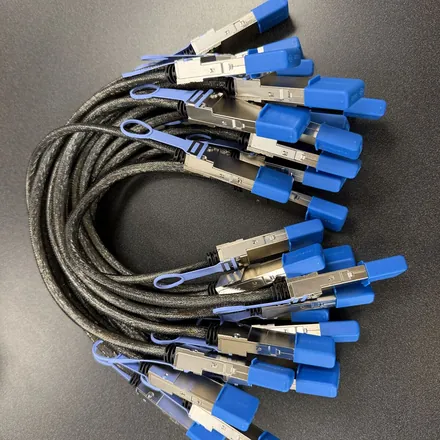
DGX Spark and GB10 Cluster Cable
The 0.5m QSFP112 400G DAC that links two NVIDIA DGX Spark units, or any two GB10 Grace Blackwell workstations, over their ConnectX-7 ports. NVIDIA-spec part, free US shipping, secure Stripe checkout with Apple Pay, Google Pay, and all major cards. From $159, with a 2-pack and a 3-pack ring kit for three-node clusters.
Find your OEM: Dell Pro Max GB10 · ASUS Ascent GX10 · HP ZGX Nano · Lenovo ThinkStation PGX · MSI EdgeXpert · Gigabyte AI TOP ATOM · Acer Veriton GN100
A hardware vendor that still answers the phone at 2am.
Most resellers stop at the shipping label. The box arrives, the invoice clears, and you are on your own when the BIOS update bricks the PCIe lanes or NCCL refuses to see all eight GPUs. Petronella Technology Group, Inc. has been racking, configuring, and supporting business hardware in Raleigh since 2002, which means every system we sell ships with the same MSP-grade lifecycle support our clients use for their managed IT operations and cybersecurity.
We sell what we run. Our internal cluster trains and serves the AI agents we ship to clients, so when you ask about multi-GPU NVLink topology or MIG GPU slicing, the answer comes from someone who debugged it last week, not from a quote sheet.
From a single workstation to a multi-rack training cluster.
The catalog covers the same equipment we deploy for healthcare, defense, finance, and SMB clients across the Triangle. Entry inference workstations start around $5,473 and scale to NVIDIA DGX systems and 8-GPU HGX B300 servers running into six figures. In between you get multi-GPU AI servers, 4U rack workstations, creative pipeline render builds, and individual RTX PRO Blackwell cards for retrofit builds.
We also stand behind emerging platforms. The Reachy Mini, an open-source humanoid research robot from Pollen Robotics and Hugging Face, is available as part of our robotics catalog with the same configuration, training, and support wrap. See the Reachy Mini hardware page for specs, pricing, and lead times.
Hardware hardened for HIPAA, CMMC, and NIST 800-171.
If your build needs to land inside a regulated environment, every system ships configured against the controls our compliance team writes for ComplianceArmor®. That means full-disk encryption, hardened OS images, audit logging turned on by default, AI subnets isolated from production traffic, and documented evidence packages for HIPAA, CMMC 2.0, and NIST 800-171 - so the hardware is audit-ready the day it boots.
Need a financing path that does not freeze your working capital? We run capital leases, FMV operating leases, and short-term notes against most of the catalog. Call (919) 348-4912 and Penny will route you to the underwriting conversation that fits your build.
Same hardware. Better deployment, better support, better ROI.
The hyperscaler resellers and large national VARs sell the same NVIDIA SKUs we do, but they sell them as line items - not as a deployed, supported system. We pre-configure CUDA, drivers, vLLM, NCCL topology, and OS hardening on our bench in Raleigh, then ship a system that is ready to train models the day it lands. See how we stack up against CDW, Rackspace, Accenture, and Dataprise.
Every hardware engagement bundles AI consulting hours so the box produces value on day one, not week six. Local Triangle clients also get same-day on-site service when something needs hands. That is the difference between buying gear and buying an outcome.
From the first phone call to a system in production.
The process starts with a phone call. Penny answers at (919) 348-4912, asks a few qualifying questions about what you plan to run, where it will live, and when you need it, then books a free 15-minute consult with the engineer who will actually configure the system. That consult is where the build takes shape: the size of the models you intend to run, how many people need them at once, whether the work is training, fine-tuning, or inference, and whether the data involved falls under HIPAA, CMMC, or NIST 800-171. Nobody on that call is working from a commission sheet, and nobody will push a DGX at a team whose workload fits on a workstation.
For rack-scale systems the next step is a site assessment: power capacity analysis, cooling evaluation, rack space planning, and a network readiness check before any hardware ships. An 8-GPU HGX server in a 6U or 8U chassis with eight 800Gbps InfiniBand ports has electrical and thermal needs that a closet built for a file server does not meet, and it is far cheaper to learn that on a walkthrough than when the pallet is on the dock. Desk-side systems such as the DGX Spark and the DGX Station GB300 run on a standard wall outlet with office-quiet fan cooling, so the assessment there is usually a short conversation about where the machine sits and how it reaches the network.
Configuration happens on our bench in Raleigh. The operating system is installed and hardened, drivers and CUDA are loaded, the NCCL topology is set so every GPU sees every other GPU at the bandwidth the hardware allows, and vLLM or the container runtime your team already uses is staged and tested. The system then goes through burn-in, receives an asset tag, and is documented so the person who inherits it in three years can understand how it was built. Within the Triangle we deliver and rack-and-stack in person. For clients elsewhere in the country, setup and training happen remotely, and a DGX Spark purchase includes up to 30 minutes of remote getting-started phone support so the first day is spent building rather than searching forums.
After delivery the relationship continues under a support contract or, more commonly, folded into the client's existing managed services agreement alongside their managed security services. That ongoing coverage is the part national resellers do not offer, and it is the reason a 2am call reaches someone who already knows your build instead of a ticket queue.
Which platform fits your workload.
The most useful sizing question is not "which GPU is fastest" but "how much memory does the model need, and how many people need it at the same time." Memory decides whether a model loads at all; concurrency decides how many GPUs you need serving it. Work through the catalog from the smallest platform upward and stop at the first one that answers both questions.
The DGX Spark puts 128 GB of unified Grace Blackwell memory and one petaFLOP of FP4 performance on a desk, runs models up to 200 billion parameters, and plugs into a normal outlet. It suits an individual researcher, a data scientist iterating on pipelines, or a small team that wants a shared prototyping box for RAG applications, agents, and fine-tuning on proprietary data. When one unit runs out of memory, two units link directly over their ConnectX-7 ports with a single 0.5m QSFP112 400G DAC, pooling memory to 256 GB, and three units form a switchless ring with three cables. Four can run as a switchless ring with four cables, and eight, the size NVIDIA has officially supported since October 2026, call for a 200G-class QSFP switch. Clustering at this scale is a capacity play rather than a speed play: each link runs at roughly 25 GB/s, so it lets you load a model too large for one node, while a job that already fits gains headroom rather than throughput. The unified memory explainer covers why that architecture avoids the CPU-to-GPU bottleneck of a conventional workstation.
The DGX Station GB300 is the step for a team that has outgrown Spark memory but has no data center: 748 GB of coherent memory and 20 PFLOPS in a desktop form factor on standard office power, from $94,231. Above that sit the rack systems. An HGX 8-GPU server uses an NVLink baseboard so training jobs scale nearly linearly across all eight GPUs instead of queuing over PCIe, with up to 2.3 TB of HBM3e on the B300 generation. Configurations run from $320,232 for the H200 platform on AMD EPYC, which also carries the shortest lead times, to $499,642 for B300 on Intel Xeon. The difference between DGX and HGX is integration: DGX is a complete, NVIDIA-validated system with AI Enterprise software, Base Command, and NVIDIA support built in, while HGX uses the same GPU baseboard integrated by a server OEM with more room to customize the host, storage, and networking. Our SXM cost analysis walks through the numbers on both paths.
Below the rack tier, the catalog fills in every gap. Entry inference workstations start around $5,473 and build up through multi-GPU training towers. Rackmount AI servers hold up to 10 GPUs per node in PCIe or NVLink topologies with single or dual CPUs. 4U rack workstations serve shared labs and hybrid on-prem deployments. Rendering builds are tuned for OctaneRender, Redshift, and Unreal. Individual RTX PRO 6000, 5000, 4500, and 4000 Blackwell cards handle retrofits into machines you already own. For workloads that span several GPUs, the choice between tensor and pipeline parallelism shapes how many cards you need and how they should be connected, and that is exactly the kind of question the consult exists to answer.
A few unnamed but typical patterns show how this plays out. A clinic that wants a clinical-notes assistant without sending patient data to a cloud API usually lands on a single Spark or an inference workstation with HIPAA hardening, because the model that does the job fits in one node. A defense subcontractor handling controlled information for a handful of engineers tends toward a two- or three-node Spark cluster on an isolated subnet, since the priority is keeping data inside the facility rather than raw throughput. A studio rendering client work overnight wants a multi-GPU render build, not an AI training server, because the software stack is different even when the cards look the same. A team training its own models on a large corpus is the one that genuinely needs HGX, and the site assessment matters more for them than the spec sheet does.
When owning the hardware beats renting it.
Cloud AI services are the right answer for a workload that is small, bursty, or experimental, and the wrong answer once usage becomes steady or the data becomes sensitive. Owned hardware is a one-time purchase with unlimited usage: there are no per-token fees, no hourly GPU rental, no egress charges, and no surprise bills at month end. The data never leaves your facility, which removes the compliance complexity of an external processor. There is no network latency, no rate limit, and no outage on a provider you do not control. You can run any model rather than only the ones a provider chooses to host. Against that, cloud spend recurs and scales with usage, and for a heavy AI workload the purchase pays for itself within months rather than years.
The honest way to decide is to measure rather than guess. Before specifying a system at production scale, run an AI prototype on our datacenter cluster and size the deployment against your real workload. Our three-stage prototype methodology ends with a written hardware blueprint: the GPU count, the networking topology, and the total-cost model your procurement team needs to compare an owned system against the cloud bill you are paying today. If the answer turns out to be a lease or a colocated build rather than a purchase, our hosting comparison lays out the lease-versus-build-and-rack tradeoffs, and the financing options below cover the middle ground.
Financing exists precisely so that the right technical answer does not freeze working capital. We run capital leases, FMV operating leases, and short-term notes against most of the catalog, so payments can be aligned with the productivity the hardware unlocks instead of paid in one block before the first model loads. Penny routes financing questions to the underwriting conversation that fits your build; there is no separate application to chase.
What a compliant hardware build actually contains.
"Compliance hardening" is easy to print on a quote and hard to deliver, so here is what it means on our bench. Full-disk encryption is enabled before the operating system is handed over. The OS image is hardened rather than left at vendor defaults. Access controls are configured so that administrative rights are deliberate, not inherited. Audit logging is turned on by default and pointed where your security team can see it. The AI subnet is isolated from production traffic so a model server cannot become a path into the rest of the network. Every one of those settings is documented in an evidence package written against the HIPAA, CMMC 2.0, and NIST 800-171 controls that our compliance team maintains for the ComplianceArmor® documentation platform, so an assessor sees configuration and proof side by side.
The team doing that work is the same four-member CMMC-RP group that runs compliance engagements for our clients: Craig Petronella, Blake Rea, Justin Summers, and Jonathan Wood. Petronella Technology Group, Inc. is a Cyber AB Registered Provider Organization, RPO #1449, and has run compliance-aware IT for healthcare, defense supply chain, legal, and financial clients for over 24 years. That matters because a hardened server is one set of controls inside a larger system, not a certificate. The hardware evidence package slots into the rest of your program, whether that program is our CMMC compliance service, a readiness assessment that shows where the gaps are before an assessor does, or documentation you already maintain with an outside 3PAO or QSA.
Two practical notes for regulated buyers. First, tell us the data classification on the first call: a build that will hold controlled information is configured differently from a research box, and it is far simpler to isolate the subnet and set the logging targets before delivery than to retrofit them. Second, plan for the people as well as the machine. The staff who will operate the system need to understand the controls they inherit, which is why security and compliance training is available alongside the hardware for teams that want it.
Order the cheapest part first, and other lessons from the bench.
Lead times track NVIDIA channel allocation more than anything we control. RTX PRO Blackwell workstations and entry inference builds typically ship in 2-4 weeks. Multi-GPU AI servers run 4-8 weeks. DGX and HGX systems are quoted with NVIDIA-published lead times at order time, generally 8-16 weeks for current generations. Reachy Mini units typically take 4-6 weeks. Those windows move, which is why every quote carries a current ETA rather than a promise copied from a brochure.
The GB10 platform sold faster than its accessory channel expected, and the part that most often holds up an otherwise complete cluster is the stacking cable. It is the cheapest component in the build and the one most likely to be backordered everywhere else when the workstations arrive. If your second Spark or OEM GB10 unit is on order, put the cable on order the same day. Ours is in stock from $159 with free US shipping, ships in 1 to 3 business days, and is built to the Amphenol NJAAKK0006 / Luxshare LMTQF022-SD-R spec named in NVIDIA's Spark Stacking documentation. Because it is a passive direct-attach copper cable with no firmware, it fits the DGX Spark Founders Edition and every Dell, ASUS, HP, Lenovo, MSI, Gigabyte, and Acer GB10 build interchangeably, and mixed-vendor clusters work because every one of those machines carries the same ConnectX-7 NIC. The cable ordering page has the 2-pack and 3-pack ring kit, the QSFP56 versus QSFP112 discussion, and the step-by-step for two-node and three-node bring-up.
Cable orders can be cancelled any time before they ship for a refund less the payment processing fee. After shipment, a return needs an RMA requested within 30 days and carries a 15% restocking fee. Full systems are built to order against your configuration, so the consult and the written quote are where changes are cheap; ask every question there. If you would rather start in writing than on the phone, the contact page reaches the same engineers, and quote requests are answered within four business hours.
Hardware we deploy
Pick the platform that matches your workload. Or call Penny - she will spec the build and book your free 15-minute consult.
NVIDIA DGX Systems
DGX B300, B200, H200, DGX Station GB300, DGX Spark. Turnkey AI supercomputers with NVIDIA Mission Control software.
Configure DGX →NVIDIA HGX Servers
8-GPU HGX B300 and B200 NVLink baseboards in 6U chassis. The build for serious training and large-model inference.
Spec an HGX server →AI Servers
Multi-GPU rackmount platforms up to 10 GPUs per node. PCIe and NVLink topologies, single and dual-CPU options.
Explore AI servers →AI Workstations
Tower and rackmount workstations from inference-class to multi-GPU training. Quiet enough for an office, fast enough for the lab.
See workstation builds →AI Rack Workstations
4U rack-mount multi-GPU workstations for shared lab use, RTP colos, and hybrid on-prem deployments.
Explore rack workstations →NVIDIA RTX PRO Blackwell
RTX PRO 6000 Blackwell, 5000, 4500, and 4000 GPUs as standalone purchases or as part of a configured workstation build.
Buy RTX PRO Blackwell →Reachy Mini
Open-source humanoid research robot from Pollen Robotics and Hugging Face. Configured, trained, and shipped with support.
See Reachy Mini →GPU Rendering Workstations
3D, VFX, simulation, and creative pipelines. RTX PRO Blackwell builds tuned for OctaneRender, Redshift, and Unreal.
Configure rendering build →Specialized configurations, deep-dives, and comparisons
- AI Development Systems
- Custom AI Training Workstations
- AI Inference Workstations
- Data Science Workstations
- NVIDIA DGX Spark
- DGX Spark Cluster Cables (in stock, ships 1-3 days)
- ConnectX-7 QSFP112 DAC Cable (in stock, ships 1-3 days)
- DGX Station GB300 Efficiency
- Grace Blackwell Unified Memory
- H100 vs H200 NVLink Scaling
- GPU Server Hosting (lease vs build-and-rack)
- NVIDIA SXM Total Cost Analysis
- NVIDIA MIG GPU Slicing
- RTX 6000 Pro Multi-GPU vLLM
- Tensor vs Pipeline Parallelism
- AMD Strix Halo AI Processors
- Apple MLX AI Development
- Intel Gaudi AI Accelerators
- Petronella vs CDW
- Petronella vs Accenture
- Petronella vs Dataprise
- Petronella vs Rackspace
- Petronella vs KnowBe4
- Custom Sites vs WordPress
Hardware questions, straight answers.
Why buy AI hardware from Petronella instead of a national reseller?
What hardware does Petronella sell?
Does Petronella offer financing for hardware purchases?
Can Petronella deploy hardware in HIPAA or CMMC compliant environments?
What is included with a hardware purchase from Petronella?
How fast can you deliver?
Ready to spec a build?
Call Penny - she answers before the third ring, asks 3 qualifying questions, then books your free 15-minute consult with the engineer who will configure your system.