
MSI EdgeXpert MS-C931 Cluster Cable: 0.5m QSFP112 400G DAC
To cluster two MSI EdgeXpert MS-C931 units you need one cable: a 0.5m QSFP112 400G passive DAC, plugged into the ConnectX-7 QSFP112 port on each unit, Port 0 to Port 0. It is built to the NVIDIA-listed Amphenol NJAAKK0006 / Luxshare LMTQF022-SD-R spec, sold here as the Amphenol NJAAKR-0006 (not the NJAAKK-N911 part number), in stock at petronellatech.com for $159 with free US shipping, shipping in 1 to 3 business days. Three units need three cables (the 3-pack ring kit is $435); NJAAKK-N911 vs NJAAKK0006: the part numbers decoded.
Outside the US? Checkout ships to US addresses only. Request a quote and we will reply with shipping options.
Read the Cable FAQTo cluster two MSI EdgeXpert MS-C931 desktops you need one 0.5m QSFP112 400G passive DAC cable in the QSFP112 port on each unit. The EdgeXpert is MSI's GB10 Grace Blackwell box and carries the same NVIDIA ConnectX-7 NIC as the DGX Spark, so it uses the exact cable NVIDIA approves in its Spark Stacking documentation (Amphenol NJAAKK0006 / Luxshare LMTQF022-SD-R spec). Petronella Technology Group, Inc. sells it at $159 with free US shipping, in stock, shipping in 1 to 3 business days. Prices and stock at other sellers change week to week, so compare ship dates as well as prices before you order.
Why buy this cable here instead of a generic compatible cable?
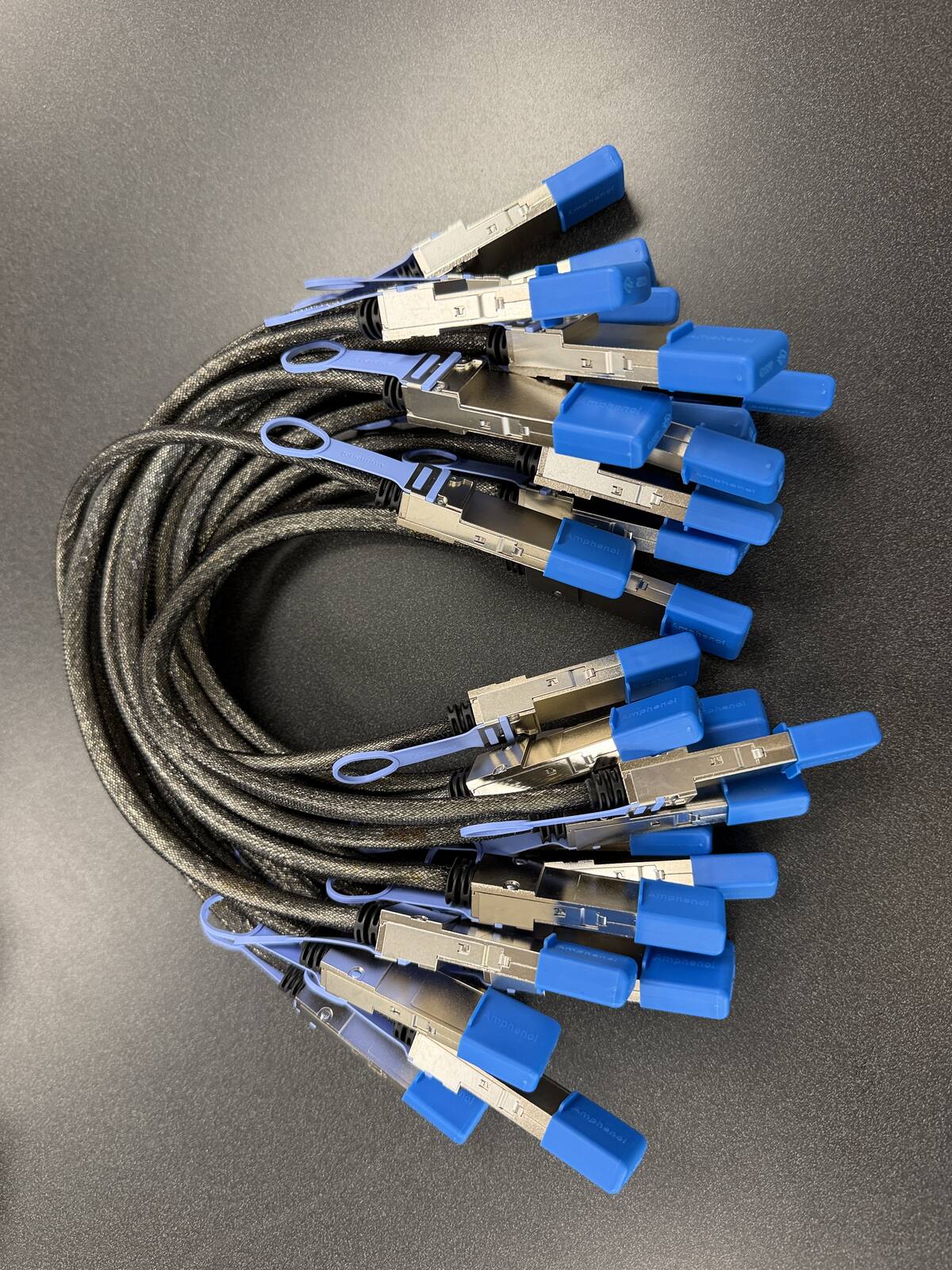
Is it a genuine Amphenol part? Yes. Each cable is factory sealed and jacket-stamped Amphenol AHSP P/N NJAAKR-0006, a 0.5m QSFP112 400G passive DAC built to the same NVIDIA Spark Stacking spec as the NJAAKK0006 / LMTQF022-SD-R references (not the same part number). The bag label is visible in the photos below.
Has it been tested in a GB10 cluster? We measured 196 Gb/s across a single 0.5m cable in our own GB10 cluster work, and the results are public in our free GB10 cluster guide on GitHub.
How fast does it arrive, and what if I change my mind? It is in stock in the US and ships in 1 to 3 business days with free US shipping. You can cancel any time before it ships for a refund less the payment processing fee (see our terms).
The MSI EdgeXpert MS-C931 leans on a vapor-chamber cooling design that MSI positions for steadier clocks under sustained load, which makes it a common pick for builders who plan to keep a clustered pair pinned at high utilization. None of that changes the interconnect: two EdgeXpert units still talk over the same single QSFP112 DAC, and that cable is the part that is hardest to source.
| Cable | 0.5m QSFP112 400G passive direct-attach copper (DAC) |
| Approved spec | Amphenol NJAAKK0006 / Luxshare LMTQF022-SD-R (NVIDIA Spark Stacking docs) |
| Fits | Both QSFP112 ports on the MSI EdgeXpert MS-C931 ConnectX-7 NIC |
| For two units | One cable |
| For a three-node ring | Three cables (switchless, each box uses both ports) |
| Price | $159, free US shipping (in stock, ships in 1 to 3 business days) |
| Multipacks | 2-pack $299, 3-pack ring kit $435 (the three cables a switchless three-node ring needs), free US shipping, US addresses only |
| Works with | NVIDIA DGX Spark, Dell Pro Max GB10, ASUS Ascent GX10, HP ZGX Nano, Lenovo ThinkStation PGX, MSI EdgeXpert, Gigabyte AI TOP ATOM, Acer Veriton GN100; brands can be mixed in one cluster |
| Returns | Cancel free before it ships; after delivery, RMA within 30 days (15% restocking fee and $20 return shipping and handling fee) |
Clustering your MSI EdgeXpert MS-C931 units: how many cables and when you need a switch
Each MSI EdgeXpert MS-C931 has two QSFP112 ports, so it follows the NVIDIA-documented GB10 topology: two units link directly with one cable, and three units form a switchless ring with three cables (NVIDIA's "Connect Three DGX Spark in a Ring Topology" playbook, each box using both ports for full pairwise connectivity). Three nodes is the switchless ceiling - with only two ports per unit, four or more units need a 200G-class QSFP switch. Clustering pools memory to run a model too large for one 128 GB node; it is a capacity play, not a speed boost, since each link runs around 25 GB/s.
Where the two QSFP112 ports sit on the MSI EdgeXpert MS-C931
The EdgeXpert MS-C931 is a 151 mm square box, a little over 5 cm tall, 1.2 liters in volume and 1.2 kg on the scale. Every connector is on the rear panel. MSI's datasheet draws the rear panel left to right as the power jack, four USB 3.2 Type-C ports, one HDMI 2.1 port, the 10 GbE RJ-45 jack, and then the ConnectX-7 QSFP pair. The user guide numbers the same panel with the power button and Kensington lock slot at the two ends. So the two QSFP112 cages are the last thing on the panel before the lock slot, with the RJ-45 jack as their only neighbor on the other side.
That neighbor matters when you follow NVIDIA's port naming. NVIDIA's ConnectX-7 networking guide defines the port closest to the Ethernet jack as the left port when you look at the back of the machine, and its three-node ring playbook calls that same port "Port0" and the one further from the Ethernet jack "Port1". On the EdgeXpert, then, Port0 is the QSFP cage beside the RJ-45 and Port1 is the cage beside the Kensington slot. Keep that straight and the ring wiring later on this page maps directly onto the chassis.
Cable dressing on a 0.5 m run
A 0.5 m passive DAC has no slack to waste, and this cable is a 30 AWG or 32 AWG copper assembly with a molded QSFP112 plug and a pull tab at each end. Set the two units side by side with their rear panels facing the same way and the run is nearly straight, which is the layout that keeps the cable off the RJ-45 and USB-C plugs. The pull tab is the release: pull the tab, never the jacket. Our return terms exclude cables that were bent past their minimum bend radius, so treat the plug body as rigid and let the bend happen in the jacket a few centimeters back from it. Do not force the plug. NVIDIA's user guide says the same: if the plug does not slide in smoothly, check the tab orientation and the alignment and try again.
Stacking, side by side, and the ventilator
MSI's user guide says the system is placed horizontally, that the enclosure ventilator handles convection cooling and must never be covered, and that up to two systems can be "stacked" using the optional QSFP cable. Its stacking illustration shows a second unit connected to the first by that cable. Because two units at 151 mm square have the same footprint, a physical stack is tempting for a tidy desk, but a clustered pair is exactly the pair you plan to keep busy. Our default advice for an EdgeXpert pair is side by side with the rear panels aligned: the 0.5 m cable reaches easily, both ventilators stay open, and you can read the link LEDs on both QSFP cages without lifting anything. If you do stack, confirm the upper unit's feet leave the lower unit's vent unobstructed before you commit to a long fine-tune. On a shelf or in a rack tray, the same rule applies: the rear panels face the aisle you cable from, and nothing sits on the vent.
MSI EdgeXpert MS-C931 configurations, and what differs from the DGX Spark Founders Edition
MSI ships the EdgeXpert in two storage configurations, 1 TB or 4 TB of self-encrypting NVMe M.2, and everything else is fixed. Every unit carries the NVIDIA GB10 Grace Blackwell Superchip with a 20-core Arm CPU (10 Cortex-X925 plus 10 Cortex-A725), a Blackwell GPU rated at 1 petaFLOP of FP4 sparse AI performance, and 128 GB of unified LPDDR5x memory on a 256-bit interface at 273 GB/s. The rear I/O is four USB 3.2 Type-C ports at up to 20 Gb/s, one HDMI 2.1 output, one RJ-45 10 GbE jack, and the dual-port ConnectX-7 Smart NIC. Wireless is Wi-Fi 7 (subject to regional approval) and Bluetooth 5.4. Power comes from an external 240 W USB PD adapter delivering 48 V at 5 A. MSI's own datasheet states that a maximum of two systems can be clustered, which matches the two-node guide it prints in the user manual.
Against the NVIDIA DGX Spark Founders Edition page the differences are cosmetic and logistical rather than architectural. The EdgeXpert wears MSI's black industrial-PC styling and ships through MSI's IPC channel and general retail. Its user guide is MSI's document, with its OS and firmware downloads hosted on MSI's IPC download page. The 4 TB option is a convenience for buyers who keep several large checkpoints local. None of that changes the interconnect. Compute, memory, and the NIC are the GB10 platform parts, the OS is NVIDIA DGX OS preinstalled, and the QSFP112 cages are the same ConnectX-7 ports NVIDIA documents for the Founders Edition.
What does not matter for clustering
Storage size does not matter: the cable and the link speed are identical on a 1 TB and a 4 TB unit. Wi-Fi does not matter, because the cluster link is wired and the 10 GbE jack handles management. The USB-C ports do not matter, and they cannot substitute for the QSFP link; USB-C tops out at 20 Gb/s on this box and carries no RoCE. The only spec on the sheet that decides your cabling is the ConnectX-7 with its two QSFP112 ports, and that spec is the same on every GB10 workstation. If you are still deciding between OEM boxes, the DGX Spark and GB10 cluster cable guide has the full compatibility table by system.
MSI's optional cable accessory
MSI's datasheet lists an optional accessory, part number 956-C931-101, described as a QSFP112 cable at 400 mm (plus or minus 15 mm), PAM-4, 112G per lane for 400G total, weighing 95 g, sold separately. The user guide separately names the approved cables for the EdgeXpert's QSFP ports: Amphenol NJAAKK-N911, with NJAAKK0006 as its 0.5 m version, and Luxshare LMTQF022-SD-R. The cable Petronella Technology Group, Inc. sells is built to that Amphenol NJAAKK0006 / Luxshare LMTQF022-SD-R spec. We do not sell MSI's branded accessory and we make no claim about how MSI sources it; we sell the reference-spec part that MSI's own manual approves for these ports.
Setting up an MSI EdgeXpert cluster: DGX OS, first boot, and verifying the ConnectX-7 link
The EdgeXpert ships with NVIDIA DGX OS preinstalled, a customized Ubuntu with the NVIDIA drivers, CUDA toolkit, Docker with the NVIDIA container runtime, and the monitoring tools already in place. MSI's guide says initial configuration is deferred to a setup wizard that runs after the first boot, so plug in the 240 W adapter, a display over HDMI (MSI suggests HDMI first if a USB-C display shows nothing), a keyboard, and the 10 GbE jack or Wi-Fi for internet, then walk the wizard on both units. Do the wizard on each unit alone, before you join them. Firmware on the EdgeXpert follows NVIDIA's DGX Dashboard method, or manually with sudo apt update && sudo apt upgrade, sudo fwupdmgr refresh, sudo fwupdmgr upgrade, and a reboot. MSI's guide notes that the Founders Edition update notes do not necessarily apply to other manufacturers' units, so use the MSI IPC download page for anything MSI-specific.
Plug in the cable and find the interfaces
Seat the DAC in one QSFP112 cage on each unit. NVIDIA's two-node playbook, which MSI reprints in the EdgeXpert manual, says any QSFP interface on each device works for a two-unit link; the ring playbook is the one that cares which port is which. Each physical QSFP port shows up in Linux as two Ethernet interfaces, so a single cable produces four interfaces on each box, and each of those has a matching RoCE device. The mapping command is the one MSI prints:
ibdev2netdevThe example output in MSI's guide shows rocep1s0f1 port 1 ==> enp1s0f1np1 (Up) alongside the enP2p1s0f1np1 twin. Use an interface that reports (Up), and MSI's guide says to prefer the enp1 names over the enP2p names for addressing. If nothing reports Up, reseat the cable, confirm it is a QSFP112 DAC and not a QSFP56 part, and reboot both units; the QSFP56 versus QSFP112 breakdown on the hub page explains why the wrong part negotiates nothing.
Addressing: netplan or manual
MSI's guide offers NVIDIA's netplan file as option one: download cx7-netplan.yaml from the NVIDIA dgx-spark-playbooks repository to /etc/netplan/40-cx7.yaml, chmod 600 it, and run sudo netplan apply on both units. Option two is manual: sudo ip addr add 192.168.100.10/24 dev enp1s0f1np1 on the first unit, .11 on the second, sudo ip link set enp1s0f1np1 up on both, then ping -c 3 across. NVIDIA's discovery script (discover-sparks, from the same repository) then finds both units and copies SSH keys so the nodes can reach each other without passwords.
Check link speed, MTU, and RoCE
Three generic commands tell you the link is right. ip link show enp1s0f1np1 should show state UP and LOWER_UP. sudo ethtool enp1s0f1np1 should report a speed of 200000 Mb/s, which is the ConnectX-7 port ceiling on every GB10 box (2x100G lanes over a PCIe Gen5 x4 link, so the "400G" on the cable label is the cable's rating, not the port's). ibstat lists each RoCE device with its rate and a link layer of Ethernet; the EdgeXpert's ports are Ethernet-only, per MSI's guide, and RoCE rides on that Ethernet link. For a real number, NVIDIA's Sync cluster assistant expects about 200 Gbit/s on the link test and treats 184 Gbit/s as the acceptable floor; our own measurements land between 185 and 190 Gb/s.
MTU: the interfaces come up at 1500, which is what MSI's example output shows, and the NVIDIA playbook does not require anything larger. Jumbo frames are optional; if you set 9000 on one side, set it on the other and prove it with ping -M do -s 8972 before you trust it. RoCE needs no separate enablement on DGX OS; the RoCE devices exist as soon as the link is up, and NCCL picks them up when you run the NCCL test suite that MSI's guide walks through. Everything from that point, including building NCCL with Blackwell support and running the two-node NCCL test, follows NVIDIA's standard DGX Spark clustering guide linked in the Sources below; MSI adds nothing EdgeXpert-specific beyond the download location for OS images.
Order the EdgeXpert cluster cable
Free US shipping on every option. In stock, ships in 1 to 3 business days.
Need a PO or invoice for 5+ cables? Send the quantity and ship-to address through our cable quote form or call (919) 348-4912, and we send a Stripe invoice for your PO. Payment is due in full before the cables ship.
Outside the US? Checkout ships to US addresses only. Request a quote and we will reply with shipping options.
Mixing the MSI EdgeXpert with other GB10 boxes, and going past three nodes
An EdgeXpert does not need another EdgeXpert on the far end of the cable. The ConnectX-7 NIC and the QSFP112 cages are platform parts, so an MSI unit links to a DGX Spark Founders Edition, to the ASUS Ascent GX10 cable page hardware, to a Dell Pro Max with GB10, to HP's ZGX Nano, to Lenovo's ThinkStation PGX, to Acer's Veriton GN100, or to Gigabyte's AI TOP ATOM with the same 0.5 m DAC and the same netplan file. The practical differences in a mixed pair are the ones you can see: the rear panels are laid out differently, so the QSFP cages on the two boxes may not line up, and 0.5 m is short. Put the two rear panels within about 30 cm of each other and orient the boxes so the cages face the same gap.
Three EdgeXpert units: the ring, mapped to the chassis
MSI's documentation stops at two units. NVIDIA's own playbook goes one further with a switchless three-node ring, and it works on any three GB10 boxes because it only uses the two ports each box already has. With the EdgeXpert port naming from earlier on this page (Port0 beside the RJ-45, Port1 beside the lock slot), the ring is: unit 1 Port0 to unit 2 Port1, unit 2 Port0 to unit 3 Port1, unit 3 Port0 to unit 1 Port1. Three cables, every unit directly connected to the other two, and each unit ends up with four addressed interfaces in NVIDIA's example. Arrange the three boxes in a shallow arc with rear panels inward and each 0.5 m run reaches its neighbor without strain; a straight row of three makes the unit 3 to unit 1 run the long one, and 0.5 m may not close it. This is what the 3-pack ring kit is for.
Four or more: plan the switch first
Two ports per box is the ceiling. A fourth EdgeXpert has nowhere to plug in on a ring, so four or more nodes go through a QSFP switch that can run every port at 200G Ethernet with RoCE. At that point each unit uses one 0.5 m DAC to the switch only if the switch sits within reach; more often the switch lives in a rack and you need longer runs, which is the one case where our 0.5 m part is the wrong length. Get the switch and its port count settled before you order cables, and the explainer on what 400G really means for a GB10 cluster before you order the switch: the interconnect is roughly 11x slower than the 273 GB/s of local memory, so every node you add buys model capacity, not tokens per second.
How Petronella Technology Group, Inc. runs its own EdgeXpert units
We are not describing this box from a spec sheet alone. Petronella Technology Group, Inc. runs four MSI EdgeXpert MS-C931 units in its own switched GB10 fabric, alongside the other GB10 systems and the larger machines that feed our LLM benchmark program. Four units is past the switchless ceiling, which is why they hang off a switch rather than a ring, and that is the layout we recommend to any buyer who already knows they will grow past three. The cables in the photos on this page are the cables in that fabric, pulled from the same shelf stock we ship.
Two things from running them daily are worth passing on. First, a link that negotiates at 200G on day one stays at 200G; the failures we have seen were seating and the wrong cable class, never the NIC. Second, the workload decides whether the cluster is worth it. A 70B-class model in a quantization that fits in one 128 GB unit runs faster on that one unit than split across two, because the split pays the interconnect tax on every layer boundary. The cluster earns its keep when the model or the context does not fit in 128 GB at all. If you want a second opinion on whether your target model fits in one EdgeXpert, the AI services team runs that sizing conversation before you buy anything.
Single, 2-pack, or 3-pack ring kit: which fits an MSI EdgeXpert buyer
The EdgeXpert sells through MSI's industrial-PC channel as much as through consumer retail, so its typical buyer is an engineering group, a lab, or a systems integrator standing up a pair for a specific model, not a hobbyist adding a second box on a whim. That shapes the recommendation.
Single, $159. Two EdgeXpert units on one desk, one project. One cable is the whole interconnect. Buy one.
2-pack, $299. The same pair, but in a lab or a client site where a dead link means a dead day. The second cable is the spare on the shelf. It also covers a pair that will be moved: a cable that lives in a travel case and a cable that stays plugged in. $149.50 per cable, and it is also the right buy for two separate pairs.
3-pack ring kit, $435. Three EdgeXpert units in NVIDIA's ring. Every unit uses both ports, so three cables is exact, with no spare; groups that want a spare on a ring order the kit plus a single. $145 per cable.
Four or more units: order the cables after the switch, and use the bulk and custom cluster quote form so we can match lengths to the rack. The cable buy post with the 2-pack and ring kit bundles carries the same three prices with purchase order instructions.
What is in the box, lead time, shipping, returns
Each cable ships as one 0.5 m QSFP112 400G passive DAC with a pull tab on each plug and protective caps on the connectors. There is no software, no adapter, and nothing to configure on the cable itself. Orders ship in 1 to 3 business days by tracked carrier, and shipping is free to US addresses only. Outside the US, call (919) 348-4912 or use the contact page for a carrier quote before you order, because the free-shipping checkout will not carry an international address. Cancel any time before the cable ships for a refund less the payment processing fee. After it ships, a return needs an RMA within 30 days, you pay return shipping, and the refund is the purchase price less a 15% restocking fee.
Where to buy: price and availability
| Source | Price | Shipping | Availability |
|---|---|---|---|
| Petronella Technology Group, Inc. | $159 | Free to US addresses | In stock, ships in 1 to 3 business days |
| Retail listings for the same NVIDIA-approved spec | Varies by seller and week | Varies | Varies by listing |
| NVIDIA marketplace | See listing | See listing | Stock varies |
Need more than three, or a length other than 0.5 m? Request a bulk or custom cluster quote, or see the larger NVIDIA DGX systems if the workload has outgrown GB10 entirely.
MSI EdgeXpert MS-C931 cluster cable FAQ
What cable do I need to cluster two MSI EdgeXpert MS-C931 units?
How many MSI EdgeXpert MS-C931 units can I cluster without a switch?
Can I cluster an MSI EdgeXpert MS-C931 with a DGX Spark or another GB10 box?
Which QSFP port on the MSI EdgeXpert should I use for a two-unit link?
Is MSI part 956-C931-101 the same as this cable?
Does the 1 TB or 4 TB EdgeXpert configuration change the cable or the cluster?
Does clustering two MSI EdgeXpert units double inference speed?
Do I need to change MTU or enable RoCE on the EdgeXpert?
Can I stack two EdgeXpert units on top of each other with the cable connected?
Is the cable in stock?
What if I need to cancel or return my order?
Sources
- MSI EdgeXpert datasheet (specifications, rear panel, accessory 956-C931-101): download-2.msi.com/archive/mnu_exe/ipc/EdgeXpert_datasheet.pdf
- MSI EdgeXpert MS-C931 user guide v1.1 (panel layout, power supply, placement, stacking, DGX OS, system clustering, approved cables): download-2.msi.com/archive/mnu_exe/ipc/C931v1.1_English.pdf
- NVIDIA DGX Spark User Guide, ConnectX-7 Networking (port naming, interfaces, 200 Gb/s per port, approved cables): docs.nvidia.com/dgx/dgx-spark/spark-clustering.html
- NVIDIA DGX Spark playbook, Connect Two Sparks: github.com/NVIDIA/dgx-spark-playbooks (connect-two-sparks)
- NVIDIA DGX Spark playbook, Connect Three Sparks in a Ring Topology: github.com/NVIDIA/dgx-spark-playbooks (connect-three-sparks)
- NVIDIA Sync User Guide, Cluster Assistant (expected 200 Gbit/s, 184 Gbit/s floor): docs.nvidia.com/sync/latest/cluster-assistant.html