
Gigabyte AI TOP ATOM Cluster Cable: 0.5m QSFP112 400G DAC
To cluster two Gigabyte AI TOP ATOM units you need one cable: a 0.5m QSFP112 400G passive DAC, plugged into the ConnectX-7 QSFP112 port on each unit, Port 0 to Port 0. It is built to the NVIDIA-listed Amphenol NJAAKK0006 / Luxshare LMTQF022-SD-R spec, sold here as the Amphenol NJAAKR-0006 (not the NJAAKK-N911 part number), in stock at petronellatech.com for $159 with free US shipping, shipping in 1 to 3 business days. It is an alternative to Gigabyte's own AI TOP QSFP Cable (ATC9000-QSFP, 0.4 m, 30 AWG), which Gigabyte sells separately for the AI TOP ATOM. Three units need three cables (the 3-pack ring kit is $435); NJAAKK-N911 vs NJAAKK0006: the part numbers decoded.
Outside the US? Checkout ships to US addresses only. Request a quote and we will reply with shipping options.
Read the Cable FAQTo cluster two Gigabyte AI TOP ATOM desktop AI supercomputers you need one 0.5m QSFP112 400G passive DAC cable in the QSFP112 port on each unit. The AI TOP ATOM is Gigabyte's build of NVIDIA's GB10 Grace Blackwell platform, tuned for local model training and fine-tuning, and it carries the same ConnectX-7 NIC as the DGX Spark, so it takes the exact cable NVIDIA approves in its Spark Stacking documentation (Amphenol NJAAKK0006 / Luxshare LMTQF022-SD-R spec). Petronella Technology Group, Inc. sells it at $159 with free US shipping, in stock, shipping in 1 to 3 business days. Prices and stock at other sellers change week to week, so compare ship dates as well as prices before you order.
Why buy this cable here instead of a generic compatible cable?
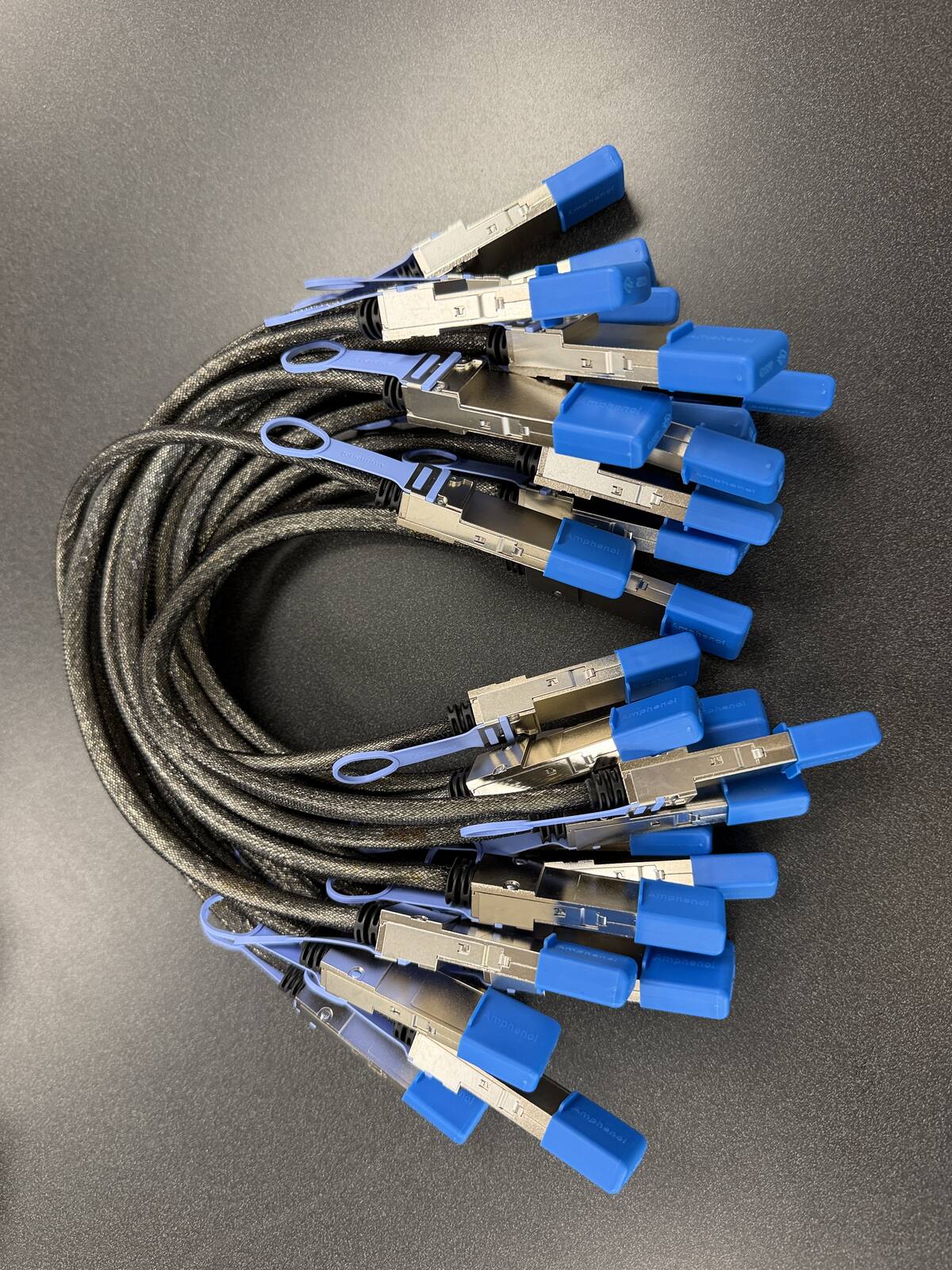
Is it a genuine Amphenol part? Yes. Each cable is factory sealed and jacket-stamped Amphenol AHSP P/N NJAAKR-0006, a 0.5m QSFP112 400G passive DAC built to the same NVIDIA Spark Stacking spec as the NJAAKK0006 / LMTQF022-SD-R references (not the same part number). The bag label is visible in the photos below.
Has it been tested in a GB10 cluster? We measured 196 Gb/s across a single 0.5m cable in our own GB10 cluster work, and the results are public in our free GB10 cluster guide on GitHub.
How fast does it arrive, and what if I change my mind? It is in stock in the US and ships in 1 to 3 business days with free US shipping. You can cancel any time before it ships for a refund less the payment processing fee (see our terms).
Gigabyte builds the AI TOP ATOM around its AI TOP ecosystem, aimed at engineers who want to train and fine-tune models locally rather than rent cloud GPUs. It runs the GB10 superchip with 128 GB of unified LPDDR5x memory, and the way you push past a single node's memory ceiling is to cable two or three ATOM units together. That interconnect is one specific part Gigabyte does not include, and it is the piece the distribution channel keeps running short on. The AI TOP ATOM exposes NVIDIA's GB10 clustering over two QSFP112 ports on the onboard ConnectX-7 NIC.
| Cable | 0.5m QSFP112 400G passive direct-attach copper (DAC) |
| Approved spec | Amphenol NJAAKK0006 / Luxshare LMTQF022-SD-R (NVIDIA Spark Stacking docs) |
| Fits | Both QSFP112 ports on the Gigabyte AI TOP ATOM ConnectX-7 NIC |
| Platform | NVIDIA GB10 Grace Blackwell, 128 GB LPDDR5x unified memory |
| For two ATOM units | One cable |
| For a three-node ring | Three cables (switchless, each box uses both ports) |
| Price | $159, free US shipping (in stock, ships in 1 to 3 business days) |
| Multipacks | 2-pack $299, 3-pack ring kit $435 (the three cables a switchless three-node ring needs), free US shipping, US addresses only |
| Works with | NVIDIA DGX Spark, Dell Pro Max GB10, ASUS Ascent GX10, HP ZGX Nano, Lenovo ThinkStation PGX, MSI EdgeXpert, Gigabyte AI TOP ATOM, Acer Veriton GN100; brands can be mixed in one cluster |
| Returns | Cancel free before it ships; after delivery, RMA within 30 days (15% restocking fee and $20 return shipping and handling fee) |
Clustering Gigabyte AI TOP ATOM units: how many cables and when you need a switch
Each AI TOP ATOM has two QSFP112 ports, so it follows the NVIDIA-documented GB10 topology: two units link directly with one cable, and three units form a switchless ring with three cables, each box using both ports for full pairwise connectivity. Three nodes is the switchless ceiling; with only two ports per unit, four or more ATOM units need a 200G-class QSFP switch. Clustering pools memory so a model too large for one 128 GB node runs across two or three boxes, which is exactly the headroom local fine-tuning workloads run out of first. It is a capacity play, not a raw speed boost, since each link runs around 25 GB/s. Because every GB10 system shares the ConnectX-7 NIC and QSFP112 spec, an AI TOP ATOM also clusters with a DGX Spark or any other OEM box over the same cable.
Where the two QSFP112 ports sit on the Gigabyte AI TOP ATOM
The AI TOP ATOM is a one-liter box: 150 mm wide, 150 mm deep, and 50.5 mm tall, 1.2 kg, powered by a 240 W external adapter. Every connector is on the rear panel. Gigabyte's spec sheet lists that panel as one USB-C power-in port, three USB 3.2 Gen 2x2 Type-C ports, one NVIDIA ConnectX-7 NIC (the two QSFP112 cages), one 10 GbE RJ-45, and one HDMI 2.1a. The only side-panel feature is a Kensington Nano slot. Hands-on reviews of the unit describe the rear layout from left to right as the power button, the four USB-C ports, HDMI, the 10 GbE RJ-45, and then the two QSFP112 ports at the far right edge of the panel.
That placement matters for cable dressing. The QSFP112 cages are the last thing on the row, so a 0.5 m DAC leaving the right-hand port has open air beside it and nothing to fight for clearance. The inner QSFP port sits next to the RJ-45, so if you also run a 10 GbE copper uplink, seat the DAC first, then the RJ-45, so the DAC's pull tab is not trapped under the Ethernet latch. Passive copper DACs are stiff compared with a patch cord. Let the cable leave the cage straight for the first few centimeters before it curves, and never crease or fold it. A DAC that is bent past its rated minimum bend radius is not returnable under our terms, and it will not pass link training either, so a lazy loop is the right shape.
Stacking or side by side: the airflow question
The ATOM draws air in through a vent on the underside near the front and exhausts through the upper rear. Two consequences follow for a two-node cluster. First, do not set a second ATOM directly on top of the first with nothing between them; the top unit's intake is the bottom unit's lid. If you want them vertical, use a shelf or a stand that leaves a clear gap under each chassis. Second, side by side on a desk is the simplest layout and the one the 0.5 m cable is sized for. Two ATOMs placed edge to edge put the right-hand QSFP ports about 15 to 30 cm apart depending on which port you use, and a 0.5 m cable spans that with a relaxed loop. Do not try to bridge units on opposite ends of a wide desk: 0.5 m is the only length NVIDIA approves for Spark stacking, and higher-speed or longer cables provide no benefit on this link.
If you are racking ATOMs on a shelf, keep the rear panels facing the same direction and leave room behind the row for the DAC loop plus the power lead and the HDMI or 10 GbE cables. The exhaust is on the rear, so the DAC will sit in warm air; passive copper does not care, but keep it clear of the vent itself so it does not block exhaust. If you are placing the units on the same shelf as a larger NVIDIA DGX system, give the ATOMs their own airflow path rather than sharing the DGX exhaust.
Gigabyte AI TOP ATOM configurations, and what matters for clustering
Gigabyte ships the AI TOP ATOM in three part numbers that differ only in the M.2 NVMe drive. Every one of them carries the same NVIDIA GB10 Grace Blackwell Superchip, a 20-core Arm CPU (10 Cortex-X925 plus 10 Cortex-A725), a Blackwell GPU rated at 1 petaFLOP FP4, 128 GB of LPDDR5x unified memory on a 256-bit bus at 273 GB/s, and the same ConnectX-7 NIC with two QSFP112 ports. Gigabyte's global availability date was October 15, 2025.
| Model | Storage | Memory | ConnectX-7 ports | Cluster cable |
|---|---|---|---|---|
| ATAGB10-9000 | 4 TB M.2 NVMe PCIe 5.0 | 128 GB LPDDR5x | 2x QSFP112 | Same 0.5m QSFP112 DAC |
| ATAGB10-9001 | 4 TB M.2 NVMe PCIe 4.0 | 128 GB LPDDR5x | 2x QSFP112 | Same 0.5m QSFP112 DAC |
| ATAGB10-9002 | 1 TB M.2 NVMe PCIe 4.0 | 128 GB LPDDR5x | 2x QSFP112 | Same 0.5m QSFP112 DAC |
How the ATOM differs from the DGX Spark Founders Edition
The DGX Spark Founders Edition is NVIDIA's own build of the same GB10 platform. The ATOM is Gigabyte's. The differences are in the parts around the superchip, not in the superchip. Gigabyte offers a 1 TB entry SKU and a choice of PCIe 4.0 or PCIe 5.0 storage, which NVIDIA's Founders Edition does not. Gigabyte lists both NVIDIA DGX OS and Ubuntu Linux as supported operating systems, adds its AI TOP Utility for model download, fine-tuning, inference, and deployment, and puts a Kensington Nano lock slot on the side. Networking beyond the ConnectX-7 is 10 GbE, Wi-Fi 7, and Bluetooth.
None of that changes the cluster cable. The GB10's ConnectX-7 NIC, its two QSFP112 ports, the PCIe Gen5 x4 lane budget behind them, and the resulting link rate of about 200 Gb/s per port are set by NVIDIA's platform, and every OEM inherits them unchanged. So the drive generation does not matter for clustering, the OS image does not matter for clustering, and the 10 GbE port does not matter for clustering; it is a management and file-transfer path, not the interconnect. What does matter is that both ATOMs (or the ATOM and whatever GB10 box you pair it with) have a QSFP112 port free and a cable built to the NVIDIA-approved spec between them. If you are still choosing between an ATOM and a Founders Edition, our local LLM benchmark leaderboards show what the GB10 memory ceiling means in practice for model size and throughput.
One point worth stating plainly: the AI TOP ATOM box contains the unit, the power adapter, and a power cord. It does not contain a QSFP112 cable. Gigabyte's own launch release says two ATOMs connected over the ConnectX-7 NIC can handle models up to 405 billion parameters, but the cable that makes that possible is a separate purchase, and it is the part that is hardest to find.
Setting up a two-node Gigabyte AI TOP ATOM cluster: first boot to a verified link
Gigabyte ships the ATOM with NVIDIA DGX OS, the Ubuntu-based image every GB10 workstation uses, so clustering follows NVIDIA's standard DGX Spark stacking guide and its "connect two Sparks" playbook. Nothing below is ATOM-specific unless marked. The only Gigabyte-specific facts we verified are the DGX OS image, the AI TOP Utility, and the rear-panel port order described above.
1. First boot and updates
Complete the DGX OS first-boot wizard on each ATOM separately (user account, network, updates) over the 10 GbE port or Wi-Fi. Bring both units fully up to date before you cable them; NVIDIA's clustering playbooks assume current firmware and drivers. Give each unit a distinct hostname now. It saves confusion later when you are reading ibdev2netdev output on two identical-looking boxes.
2. Cable the ConnectX-7 ports
Power both units down, seat one end of the 0.5 m QSFP112 DAC in a QSFP112 port on the first ATOM and the other end in the matching port on the second. NVIDIA's playbook accepts any QSFP port on each device but recommends using the same physical port on both, which keeps interface names symmetric. Push until the latch clicks, then a gentle tug on the housing (not the pull tab) confirms it is seated. Power both units back on.
3. Verify the link
NVIDIA's own first check is ibdev2netdev, which maps each ConnectX-7 device to its Ethernet interface and shows whether the port is Up. Each physical QSFP port exposes two logical interfaces (NVIDIA's playbook uses enp1s0f1np1 and enP2p1s0f1np1 as its examples; your names may differ by port). Then confirm speed:
ibdev2netdev
ip -br link show | grep -i np
sudo ethtool enp1s0f1np1 | grep -E "Speed|Link detected"
ibstat
A healthy link shows the port Up in ibdev2netdev, ethtool reporting a 200000 Mb/s speed with Link detected: yes, and ibstat listing the RoCE device in the Active state. If ethtool shows no link at all, reseat the cable at both ends before you touch software; a DAC that is one millimeter short of the latch is the most common cause. The port pair negotiates at about 200 Gb/s (two 100G lanes over PCIe Gen5 x4), and real-world measurements land at 185 to 190 Gb/s. Our explainer on what 400G really means on a GB10 walks through why the cable is rated 400G and the link runs at 200G.
4. Assign addresses
NVIDIA's playbook puts the two logical interfaces of the cabled port on two private subnets, 192.168.100.0/24 and 192.168.101.0/24, with .10 on node one and .11 on node two. The quick, non-persistent form is:
sudo ip addr add 192.168.100.10/24 dev enp1s0f1np1
sudo ip link set enp1s0f1np1 up
sudo ip addr add 192.168.101.10/24 dev enP2p1s0f1np1
sudo ip link set enP2p1s0f1np1 up
Repeat on the second ATOM with .11, then ssh 192.168.100.11 hostname from node one. For a persistent configuration, NVIDIA's playbook writes the same addresses into a netplan file under /etc/netplan/ and applies it. NVIDIA notes that full bandwidth is available over one cable; a second cable between the same two boxes is optional and only requires addresses on all four logical interfaces.
5. MTU and RoCE basics
The ConnectX-7 ports on a GB10 are Ethernet only; NVIDIA documents them as supporting Ethernet configuration, not InfiniBand, and they carry RoCE (RDMA over Converged Ethernet) for NCCL and other RDMA traffic. NVIDIA's playbook output shows the default MTU of 1500 and does not require changing it. If you choose to raise MTU for large-tensor traffic, set it identically on both ends of the link and verify with ip link show; a mismatch silently drops large frames and looks like a slow cluster. For NCCL jobs, point NCCL_SOCKET_IFNAME at the cabled Ethernet interface so traffic does not fall back to the 10 GbE port, and confirm the RoCE device appears in ibstat before you troubleshoot NCCL itself.
What clustering buys you on the ATOM. The interconnect is about 200 Gb/s, or roughly 25 GB/s. Local memory bandwidth on each GB10 is 273 GB/s. The link is therefore about 11x slower than local memory, so clustering two ATOMs adds capacity (256 GB of pooled memory for a model that will not fit in 128 GB), not speed on a model that already fits. Plan a two-node ATOM cluster around model size, not tokens per second.
Free US shipping on every option. In stock, ships in 1 to 3 business days.
Need a PO or invoice for 5+ cables? Send the quantity and ship-to address through our cable quote form or call (919) 348-4912, and we send a Stripe invoice for your PO. Payment is due in full before the cables ship.
Outside the US? Checkout ships to US addresses only. Request a quote and we will reply with shipping options.
Mixing the AI TOP ATOM with DGX Spark and other GB10 boxes, and growing past three nodes
Because the interconnect is defined by NVIDIA's GB10 platform rather than by the chassis vendor, an AI TOP ATOM clusters with any other GB10 workstation over the same cable. That includes the DGX Spark Founders Edition and every OEM build: the ASUS Ascent GX10, the Dell Pro Max with GB10, the MSI EdgeXpert MS-C931, the HP ZGX Nano AI Station, the Lenovo ThinkStation PGX, and the Acer Veriton GN100. Each has the same ConnectX-7 NIC, the same two QSFP112 ports, and the same 128 GB of unified memory, so a mixed pair behaves exactly like a matched pair. The practical differences in a mixed cluster are physical, not electrical: port position on the rear panel varies by OEM, so check the 0.5 m reach before you commit to a shelf layout, and keep both units on the same DGX OS release so driver versions match.
Three ATOMs: the switchless ring
Three ATOMs are the largest switchless cluster the platform supports. Each unit uses both QSFP112 ports, cabled A to B, B to C, and C to A, so every node has a direct link to every other node. That takes three cables, which is why we sell the ring kit. NVIDIA documents the direct three-node connection as a supported topology alongside the two-node link.
Four or more: what Gigabyte itself did
With only two ports per box, four ATOMs cannot be fully meshed with cables. Gigabyte's own July 2026 demonstration of a four-node AI TOP ATOM cluster for scientific computing used a RoCE-capable 200 GbE switch, with each of the four nodes contributing its 128 GB of unified memory to the pool. That is the pattern to copy: one QSFP112 DAC from each ATOM to a switch port that supports 200G and RoCE, which means one cable per node rather than one per pair. Cable length becomes a switch-placement question at that point, and the 0.5 m stacking cable is only the right part if the switch sits on the same shelf within reach. For a four-node or larger ATOM build, tell us the switch model and the shelf layout through the cluster quote form on our cable guide and we will confirm the count and length before you order.
Which cable option fits your Gigabyte AI TOP ATOM build
The typical ATOM buyer is an engineer, researcher, or small lab running fine-tuning or inference locally, often starting with one unit and adding a second when a model outgrows 128 GB. That maps cleanly to three options.
- Single, $159. Two ATOMs, one link, full bandwidth. This is the right order for almost every two-node build. NVIDIA confirms one cable delivers the full link rate, so a second cable between the same two boxes is not a speed upgrade.
- 2-Pack, $299 ($149.50 per cable, save $19). For a lab that keeps a spare on the shelf, or for two separate two-node pairs. A DAC is a passive part with no firmware, but a bent or crushed one is a dead link, and the lead time from other channels is what makes a spare worth having.
- 3-Pack Ring Kit, $435 ($145 per cable, save $42). Three ATOMs in the switchless ring described above. Order all three at once so they arrive together and the ring comes up in one session.
What is in the box, and what is not
Your AI TOP ATOM ships with the unit, its 240 W adapter, and a power cord. Our shipment is the cable only: a 0.5 m QSFP112 400G passive copper DAC built to the NVIDIA-approved Amphenol NJAAKK0006 / Luxshare LMTQF022-SD-R reference spec (the part NVIDIA sells as the DGX Spark Stacking DAC Cable, QSFP/CX7), with a pull tab on each end. No transceivers, no software, no drivers; DGX OS already has the ConnectX-7 driver. If you would rather see the whole line, including the bundle pricing, our in-stock announcement post covers every GB10 workstation and the bundles.
Lead time, shipping, and returns
Orders ship from our stock in 1 to 3 business days with a tracking number by email. Shipping is free to US addresses only. If you are outside the US, call (919) 348-4912 or use the contact page for an international shipping quote before you order, because carrier costs vary by destination. Once it ships, a return needs an RMA within 30 days, you pay return shipping and handling, and the refund is the purchase price less a 15% restocking fee and a flat $20 return shipping and handling fee. You can cancel any time before the cable ships for a refund less the payment processing fee. For purchase orders, tax-exempt purchases, or quantities beyond three, the GB10 cluster cable hub page covers ordering by PO and bulk quotes in detail.
Price check: the same NVIDIA-approved spec, three places to buy it
| Source | Price | Shipping | Availability |
|---|---|---|---|
| Petronella Technology Group, Inc. | $159 | Free to US addresses | In stock, ships in 1 to 3 business days |
| Retail listings for the same spec | Varies by seller and week | Varies by seller | Varies by seller |
| NVIDIA marketplace | Listed lower | NVIDIA terms | Stock varies |
One cable, seated in the right-hand QSFP112 port on each unit, is the whole job. It is on our shelf now.
Need more than three, or a length for a switch? Request a bulk or custom cluster quote.
Gigabyte AI TOP ATOM cluster cable FAQ
What cable clusters two Gigabyte AI TOP ATOM units?
Does the Gigabyte AI TOP ATOM come with a QSFP112 cable in the box?
Which QSFP112 port on the AI TOP ATOM should I use?
Can I cluster an AI TOP ATOM with a DGX Spark or another OEM box?
Does the 1 TB AI TOP ATOM need a different cable than the 4 TB PCIe 5.0 model?
How fast is the link between two AI TOP ATOMs, and does clustering make inference faster?
How do I check that the AI TOP ATOM link came up at 200G?
Can I run four Gigabyte AI TOP ATOMs together?
Is the Gigabyte AI TOP ATOM cluster cable in stock?
What if I need to cancel or return my AI TOP ATOM cable order?
Sources
- GIGABYTE AI TOP ATOM specifications (ATAGB10-9000 / -9001 / -9002; ports, memory, storage, dimensions, box contents): aorus.com/en-us/desktop-pc/gigabyte-ai-top-atom/Specification
- GIGABYTE AI TOP ATOM product page (ConnectX-7 NIC, two-unit scaling, AI TOP Utility): gigabyte.com/AI-TOP-PC/GIGABYTE-AI-TOP-ATOM
- GIGABYTE press release, global availability October 15 and two-unit 405B-parameter claim: gigabyte.com/press/news/2325
- GIGABYTE press release, four-node AI TOP ATOM cluster over a RoCE-capable 200 GbE switch (July 2026): gigabyte.com/press/news/2430
- NVIDIA DGX Spark documentation, Spark Stacking (approved cables, Ethernet-only ports, up to 200 Gb/s, two-node, three-node, and switch topologies): docs.nvidia.com/dgx/dgx-spark/spark-clustering.html
- NVIDIA DGX Spark playbook, Connect Two Sparks (ibdev2netdev, interface names, addressing, one cable for full bandwidth): github.com/NVIDIA/dgx-spark-playbooks (connect-two-sparks)
- Rear-panel port order and airflow, hands-on reviews: ServeTheHome and StorageReview