
Dell Pro Max with GB10 Cluster Cable: 0.5m QSFP112 400G DAC
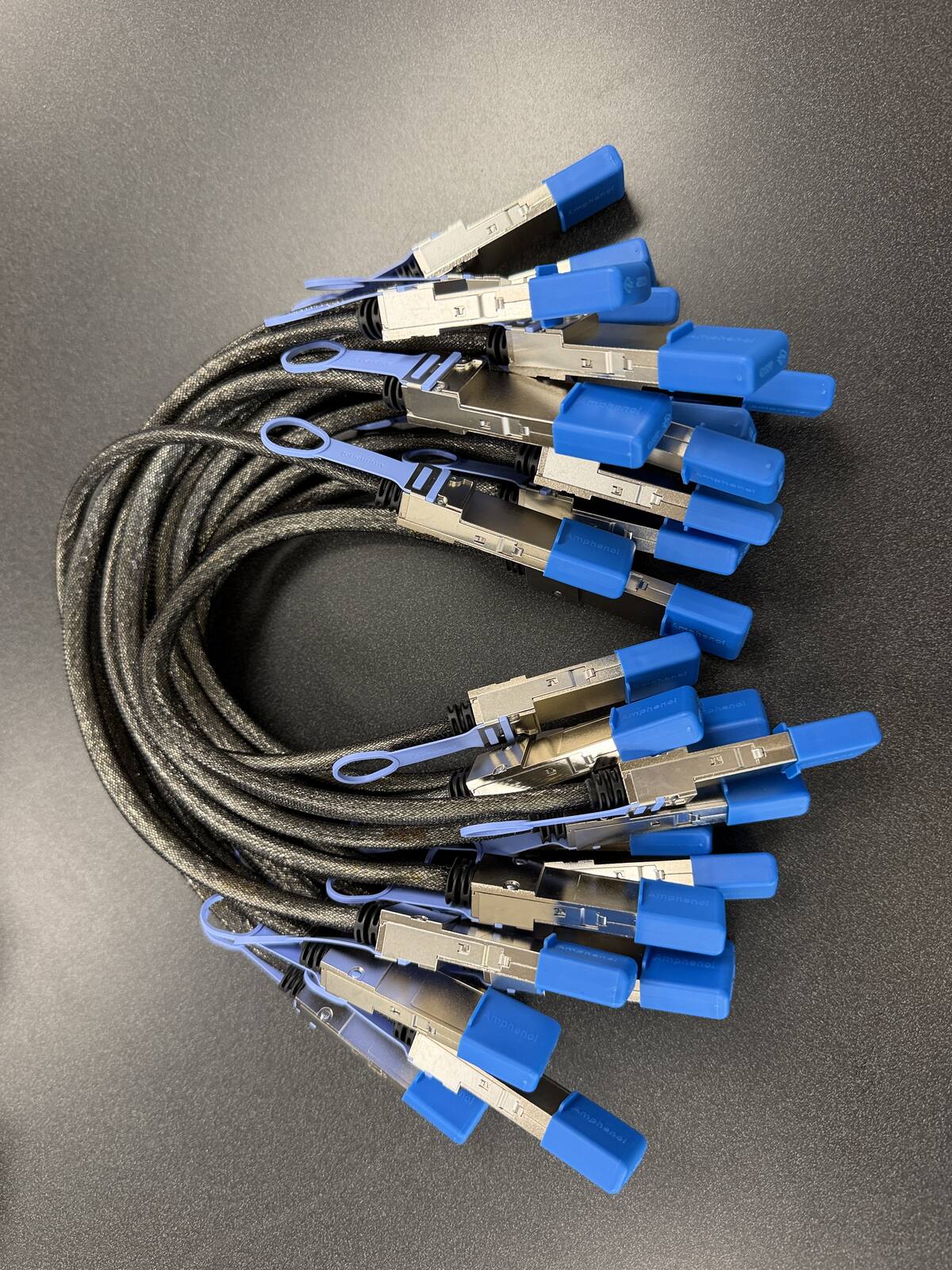
To cluster two Dell Pro Max with GB10 units you need one cable: a 0.5m QSFP112 400G passive DAC, plugged into the ConnectX-7 QSFP112 port on each unit, Port 0 to Port 0. It is built to the NVIDIA-listed Amphenol NJAAKK0006 / Luxshare LMTQF022-SD-R spec, sold here as the Amphenol NJAAKR-0006 (not the NJAAKK-N911 part number), in stock at petronellatech.com for $159 with free US shipping, shipping in 1 to 3 business days. Three units need three cables (the 3-pack ring kit is $435); NJAAKK-N911 vs NJAAKK0006: the part numbers decoded.
Outside the US? Checkout ships to US addresses only. Request a quote and we will reply with shipping options.
Read the Cable FAQTo cluster two Dell Pro Max workstations with the GB10 Grace Blackwell superchip you need one 0.5m QSFP112 400G passive DAC cable in the QSFP112 port on each unit. Dell's GB10 system carries the same NVIDIA ConnectX-7 NIC as the DGX Spark, so it takes the exact cable NVIDIA approves in its Spark Stacking documentation (Amphenol NJAAKK0006 / Luxshare LMTQF022-SD-R spec). Petronella Technology Group, Inc. sells it at $159 with free US shipping, in stock, shipping in 1 to 3 business days. Prices and stock at other sellers change week to week, so compare ship dates as well as prices before you order.
Why buy this cable here instead of a generic compatible cable?
Is it a genuine Amphenol part? Yes. Each cable is factory sealed and jacket-stamped Amphenol AHSP P/N NJAAKR-0006, a 0.5m QSFP112 400G passive DAC built to the same NVIDIA Spark Stacking spec as the NJAAKK0006 / LMTQF022-SD-R references (not the same part number). The bag label is visible in the photos below.
Has it been tested in a GB10 cluster? We measured 196 Gb/s across a single 0.5m cable in our own GB10 cluster work, and the results are public in our free GB10 cluster guide on GitHub.
How fast does it arrive, and what if I change my mind? It is in stock in the US and ships in 1 to 3 business days with free US shipping. You can cancel any time before it ships for a refund less the payment processing fee (see our terms).
The Dell Pro Max with GB10 brings NVIDIA's GB10 desktop AI platform into Dell's enterprise workstation line, which means IT teams often deploy them in pairs or small clusters under managed procurement. Whichever way you buy the machines, the interconnect is the same single niche part, and it is the one component distributors rarely keep on the shelf.
| Cable | 0.5m QSFP112 400G passive direct-attach copper (DAC) |
| Approved spec | Amphenol NJAAKK0006 / Luxshare LMTQF022-SD-R (NVIDIA Spark Stacking docs) |
| Fits | Both QSFP112 ports on the Dell Pro Max GB10 ConnectX-7 NIC |
| For two units | One cable |
| For a three-node ring | Three cables (switchless, each box uses both ports) |
| Price | $159, free US shipping (in stock, ships in 1 to 3 business days) |
| Multipacks | 2-pack $299, 3-pack ring kit $435 (the three cables a switchless three-node ring needs), free US shipping, US addresses only |
| Works with | NVIDIA DGX Spark, Dell Pro Max GB10, ASUS Ascent GX10, HP ZGX Nano, Lenovo ThinkStation PGX, MSI EdgeXpert, Gigabyte AI TOP ATOM, Acer Veriton GN100; brands can be mixed in one cluster |
| Returns | Cancel free before it ships; after delivery, RMA within 30 days (15% restocking fee and $20 return shipping and handling fee) |
Clustering your Dell Pro Max GB10 units: how many cables and when you need a switch
Each Dell Pro Max GB10 has two QSFP112 ports, so it follows the NVIDIA-documented GB10 topology: two units link directly with one cable, and three units form a switchless ring with three cables (NVIDIA's "Connect Three DGX Spark in a Ring Topology" playbook, each box using both ports for full pairwise connectivity). Three nodes is the switchless ceiling - with only two ports per unit, four or more units need a 200G-class QSFP switch. Clustering pools memory to run a model too large for one 128 GB node; it is a capacity play, not a speed boost, since each link runs around 25 GB/s.
Where the QSFP ports sit on the Dell Pro Max with GB10, and how to dress the cable
Dell puts every connector on the back of the Pro Max with GB10 (model FCM1253); the front face is bare. Dell's owner's manual numbers the back panel in this order: power button, a dedicated Type-C power-in port, three USB 3.2 Gen 2x2 Type-C ports with DisplayPort 1.4a alt-mode, one HDMI 2.1a port, one RJ-45 10GbE jack, and finally the two QSFP (200 Gbps) ports. In practice that means the QSFP pair sits at the end of the port row, right beside the RJ-45 jack and as far from the power-in port as the chassis allows. When you are reaching behind a unit, find the 10GbE jack first and the two cluster ports are next to it.
NVIDIA's Spark Stacking documentation defines the "left" QSFP port, as seen from the back, as the port closest to the Ethernet jack. Both Dell's own clustering article (Dell knowledge base 000400252) and NVIDIA's connect-two-sparks playbook tell you to use the same physical port on each machine for a two-node link, because the interface names in Linux follow the port position and mismatched ports confuse NCCL tests. On a pair of Dell units the simplest rule is: cable the port nearest the RJ-45 jack on both boxes. For a three-node ring every unit uses both ports, so the rule becomes "keep the wiring pattern identical on all three".
Cable dressing on this port layout
Dell's manual carries a note that matters more on this chassis than on most: because the ports are so close together, Dell recommends plugging Type-C cables in from right to left and using cables with connector bodies no wider than 6.5 mm. The QSFP112 cage is the largest connector on the panel, and the DAC's pull-tab latch needs finger clearance above it. Seat the cluster cable first, then the RJ-45 uplink, then the USB-C devices, and you will not be fighting the Type-C plugs for space. A passive 0.5m DAC is 30 or 32 AWG twinax with a stiff jacket. Let it leave the cage straight for a few centimetres before it curves, do not fold it flat against the rear panel, and never crease it at the connector boot. Cables bent past their minimum bend radius are excluded from our return policy for the same reason: a kinked twinax pair drops the link or throws errors that look like a software fault.
Two units side by side are 150 mm wide each, so a 0.5m cable between the right-hand ports of one and the other leaves a relaxed loop rather than a tight U-turn. Stacked, the run is shorter and the loop hangs behind the pair. Either way, leave the RJ-45 uplink on each unit so DGX OS updates, SSH, and the desktop keep working over your LAN while the QSFP link carries only cluster traffic.
Stacking and shelf placement for the Dell form factor
The Pro Max with GB10 has a 150 x 150 mm footprint, stands 45.5 mm tall at the front and back edges and 51 mm at its peak, and weighs 1.22 to 1.34 kg depending on configuration. The main chassis is Magnetite anodized aluminum with a rubber foot underneath, so two units stack cleanly on a desk. The domed top means the upper surface is not flat: stack a second unit, not a monitor or a switch. Dell rates the machine for 0 to 35 C operating, so leave open air around the pair and keep the two 280 W USB-C power adapters (each 162 x 78 x 23 mm) off the top of the stack. On a 19-inch rack shelf two units sit side by side with room for the cable loop; three units are exactly 450 mm wide with no room for the cable bends, so a three-node ring belongs on two shelves or on a desk. If you are laying out a larger AI workstation footprint, our NVIDIA DGX hardware overview covers the rack-scale options that start where GB10 desktops stop.
Dell Pro Max with GB10 configurations, and what differs from the DGX Spark Founders Edition
Dell ships the Pro Max with GB10 in a small number of factory configurations. Every one of them carries the same NVIDIA GB10 Grace Blackwell superchip (10 Cortex-X925 performance cores plus 10 Cortex-A725 efficiency cores, with the Blackwell GPU on the same package), the same 128 GB of LPDDR5x unified memory at 273 GB/s, and the same ConnectX-7 NIC with two QSFP ports. What changes between configurations is the single M.2 drive: Dell's spec sheet lists a 2 TB M.2 2230 QLC drive and a 4 TB M.2 2242 TLC self-encrypting (Opal 2.0, SED-ready) drive as the standard options, with 1 TB variants available only through custom factory integration. Dell's US configurator listed the system from about $8,224 as of September 2026, and it offers a QSFP DAC as an optional line item, singly or as a pair, at order time. Warranty starts at one year of Basic Hardware Service with onsite service after remote diagnosis and can be raised to ProSupport or ProSupport Plus for up to three years, with Keep Your Hard Drive as an add-on.
| Item | Dell Pro Max with GB10 (FCM1253) | NVIDIA DGX Spark Founders Edition | Matters for clustering? |
|---|---|---|---|
| Superchip | NVIDIA GB10, 20 Arm cores, Blackwell GPU, up to 1 PFLOP FP4 | NVIDIA GB10, same silicon | Identical |
| Memory | 128 GB LPDDR5x, 273 GB/s unified | 128 GB LPDDR5x, 273 GB/s unified | Identical; two nodes pool 256 GB |
| Cluster NIC | ConnectX-7, two QSFP (200 Gbps) ports | ConnectX-7, two QSFP ports at 200 Gbps | Identical; same cable |
| Storage | One M.2: 2 TB QLC (2230) or 4 TB TLC SED (2242) standard; 1 TB by custom order | 4 TB self-encrypting NVMe | No |
| Wired LAN | RJ-45 10GbE (Realtek RTL8127-CG) | RJ-45 10GbE | No; use it for management |
| Wireless | Wi-Fi 7 and Bluetooth 5.4 (AzureWave AW-EM637) | Wi-Fi 7 and Bluetooth 5.4 | No |
| USB-C | Three 20 Gbps data ports plus a separate Type-C power-in | Four USB Type-C | No; Dell's dedicated power-in frees a data port |
| Video | HDMI 2.1a plus DisplayPort over USB-C | HDMI 2.1a plus DisplayPort over USB-C | No |
| Size and weight | 150 x 150 mm, 45.5 mm edge / 51 mm peak, 1.22 to 1.34 kg | 150 x 150 x 50.5 mm, 1.2 kg | No; both stack the same way |
| Power adapter | 280 W USB Type-C | 240 W | No |
| Operating system | NVIDIA DGX OS (Dell's configurator lists DGX OS 7) | NVIDIA DGX OS | Same software stack |
| Security | TPM 2.0, optional Opal SED drive | Self-encrypting drive | No |
The short version: nothing Dell changed touches the interconnect. Storage size, warranty tier, adapter wattage, and the anodized chassis are procurement decisions, not networking ones. Dell's own brochure describes the machine as stackable, running models up to about 200 billion parameters on one unit and up to about 400 billion parameters across two units linked through the ConnectX-7 NIC, which is exactly the two-node use case this cable serves. If you are still deciding between the Dell and the Founders Edition, our DGX Spark buying guide compares the OEM GB10 systems side by side, and the LLM benchmark leaderboards show which model sizes actually fit in 128 GB versus 256 GB.
Setting up a two-node cluster on Dell's DGX OS image
Dell ships the Pro Max with GB10 with NVIDIA DGX OS preinstalled, the same Ubuntu-based image and NVIDIA AI software stack the Founders Edition uses. Dell's manual describes two first-boot paths: a wired setup with a monitor and keyboard, or a wireless setup where the unit broadcasts a hotspot SSID printed on its label and you finish DGX OS setup from a laptop or phone. Complete that setup on both machines, connect each RJ-45 port to your LAN, and apply DGX OS updates before you touch the cluster link. Dell publishes its own two-node procedure as knowledge base article 000400252, "How to Cluster Two Dell Pro Max with GB10 systems (FCM1253)", last revised in May 2026. It follows NVIDIA's connect-two-sparks playbook step for step, so anything not marked Dell-specific below is the standard DGX Spark clustering method.
Step 1: cable and confirm the link (Dell-verified)
Dell's prerequisites list is short: two Pro Max with GB10 units, one QSFP cable between the ConnectX-7 ports, internet access for package installs, and sudo on both machines. Plug the 0.5m DAC into the same physical port on each unit, then run the NVIDIA mapping tool on either box:
ibdev2netdev
ip link show
ethtool enp1s0f1np1 | grep -i speed
ibstat
ibdev2netdev maps each ConnectX-7 device to its Linux interface and prints the state; you want the interface on the cabled port to read Up. Each physical QSFP port shows up as two logical interfaces, so a two-port NIC lists four. Dell's article uses the names enp1s0f0np0 and enp1s0f1np1, and in one place enP2p1s0f1np1; check what ibdev2netdev prints on your unit rather than copying names from a guide. ethtool should report 200000Mb/s on a good link. ibstat reports the link layer as Ethernet, not InfiniBand, which is correct: the GB10 ConnectX-7 runs RoCE over Ethernet. If nothing shows Up, reseat the cable at both ends, reboot both units, and check again before you suspect the hardware.
Step 2: give the link addresses (Dell-verified)
Dell offers two ways to address the cluster link. The first is a netplan file at /etc/netplan/40-cx7.yaml that enables IPv4 link-local addressing on both ConnectX-7 interfaces, followed by sudo chmod 600 /etc/netplan/40-cx7.yaml and sudo netplan apply. The second is a static pair of addresses, which is easier to reason about when you are testing:
# Node 1
sudo ip addr add 192.168.100.10/24 dev enp1s0f1np1
sudo ip link set enp1s0f1np1 up
# Node 2
sudo ip addr add 192.168.100.11/24 dev enp1s0f1np1
sudo ip link set enp1s0f1np1 up
# From node 1
ping -c 3 192.168.100.11
Both Dell's article and NVIDIA's playbook use the 192.168.100.0/24 range for the first port, and NVIDIA adds 192.168.101.0/24 for the second port when both are cabled. Use a range that does not overlap your LAN. The static form does not survive a reboot unless you also write it into netplan, which is why Dell's article leads with the YAML.
Step 3: MTU and RoCE basics (standard, not Dell-specific)
NVIDIA's playbook shows the ConnectX-7 interfaces at the default MTU of 1500 and does not require a change for the two-node test. Many operators raise both ends to 9000 for RoCE traffic; if you do, set the same value on both units with sudo ip link set enp1s0f1np1 mtu 9000 and confirm with ip link show, because a mismatched MTU across a point-to-point link produces silent drops on large transfers. RoCE itself needs no extra configuration on DGX OS; NCCL discovers the ConnectX-7 devices on its own. The link negotiates at about 200 Gb/s per port, which is two 100 Gb/s lanes behind a PCIe Gen5 x4 connection, and real transfers land around 185 to 190 Gb/s. Our explainer on what 400G really means for a GB10 cluster walks through why a 400G-rated cable delivers a 200G link here.
Step 4: SSH, MPI, and the NCCL test (Dell-verified)
Dell's article then runs the DGX discovery script to set up passwordless SSH between the two nodes, installs Open MPI with sudo apt install -y openmpi-bin libopenmpi-dev, builds nccl-tests against NCCL 2.27, and runs an all-reduce benchmark across both machines:
mpirun -np 2 -H 192.168.100.10:1,192.168.100.11:1 \
  -bind-to none -map-by slot \
  -x NCCL_DEBUG=INFO -x LD_LIBRARY_PATH -x PATH \
  ./build/all_reduce_perf -b 8 -e 512M -f 2 -g 1
With NCCL_DEBUG=INFO the log names the transport it picked; you want to see the ConnectX-7 interface, not the 10GbE RJ-45. If the test falls back to the RJ-45 path, the usual cause is a mismatched port choice between the two units or an interface that never came Up. The result you should expect is a working 256 GB pool for model capacity, not a faster single model: the 273 GB/s local memory on each unit is roughly 11 times faster than the cluster link, so clustering lets you load a model that does not fit on one Dell, and it does not make a model that already fits run faster.
Order the Dell Pro Max with GB10 cluster cable
One cable per pair, three for a ring. Every option is the same 0.5m QSFP112 400G passive DAC built to the NVIDIA-approved Amphenol NJAAKK0006 / Luxshare LMTQF022-SD-R spec.
Free US shipping on every option. In stock, ships in 1 to 3 business days.
Need a PO or invoice for 5+ cables? Send the quantity and ship-to address through our cable quote form or call (919) 348-4912, and we send a Stripe invoice for your PO. Payment is due in full before the cables ship.
Outside the US? Checkout ships to US addresses only. Request a quote and we will reply with shipping options.
Mixing the Dell Pro Max with GB10 with other GB10 boxes, and going past three nodes
Because every GB10 workstation carries the same ConnectX-7 NIC with the same two QSFP ports, a Dell Pro Max with GB10 clusters with a DGX Spark Founders Edition or with any other OEM's GB10 system over this same cable. The link does not care which badge is on the chassis. A common real-world pair is one Dell bought through a corporate Dell agreement next to a Founders Edition someone ordered earlier; they form a two-node cluster exactly as two Dells would. The same holds for an ASUS Ascent GX10 paired with a Dell, a Dell next to an HP ZGX Nano, or a Dell and Lenovo ThinkStation PGX pair in the same IT estate. The only practical differences are cosmetic: the port order on the back panel changes from vendor to vendor, so re-read the "same physical port on both ends" rule when the two chassis are not identical, and the DGX OS build date may differ, so update both before you run NCCL tests.
Three nodes is the switchless ceiling. With two ports per unit, three Dells form a ring with three cables, each unit connected directly to the other two, and NVIDIA publishes that topology as an official playbook. A fourth Dell has nowhere to plug in. Four or more units need a 200G-class QSFP switch, with every unit running one or two cables into the switch instead of into each other, and at that point you are choosing a switch, its optics or DACs, and its power budget before you choose anything else. The DGX Spark cluster cable hub covers switch planning and the QSFP56 versus QSFP112 question in depth, so this page does not repeat it. If your Dell units are joining a rack of MSI EdgeXpert, Acer Veriton GN100, or Gigabyte AI TOP ATOM systems behind a switch, the same 0.5m DAC still works for any direct GB10-to-GB10 links you keep, and the switch side needs cables sized to its port pitch and rack position.
Which cable option fits a Dell Pro Max with GB10 buyer
Dell's enterprise channel means these units often arrive in twos and threes on a single purchase order, sometimes months apart, and often without the optional DAC ticked on the configurator. Here is how we advise buyers to size the order.
Single cable, $159. Two Dell units on one desk or one shelf. This is the only part you need beyond what came in Dell's box. Order it the day the second unit ships so it is waiting when the machine arrives.
2-Pack, $299. Two units today with a spare on the shelf, or two separate pairs in two offices. At $149.50 per cable it saves $19 against two singles, and a spare matters because a DAC is a wear item at the latch and pull-tab, and a crushed cable is not returnable. IT teams that treat the GB10 pair as a production inference box usually keep the spare in the drawer with the units' service tags.
3-Pack Ring Kit, $435. Three Dell units in a switchless ring. Each unit uses both QSFP ports, so the ring needs exactly three cables, and the kit prices them at $145 each, a $42 saving. If your third unit is still on order, the kit is also the right buy for two units plus a spare.
What is in the box, lead time, shipping, and returns
Each order ships the cable itself, a 0.5m QSFP112 400G passive DAC with pull-tab latches on both ends, built to the NVIDIA-approved Amphenol NJAAKK0006 / Luxshare LMTQF022-SD-R reference spec. It needs no transceiver, no driver, and no firmware update on the Dell; DGX OS recognizes the ConnectX-7 link the moment both ends are seated. Orders ship in 1 to 3 business days with a tracking number by email. Shipping is free to US addresses. Outside the US, call (919) 348-4912 or use the contact page for a carrier quote before you order. If you need to return a cable, request an RMA within 30 days of delivery; you pay return shipping and handling, and the refund is the purchase price less a 15% restocking fee and a flat $20 return shipping and handling fee. You can cancel any time before the cable ships for a refund less the payment processing fee.
| Where you buy | Price for the NVIDIA-approved 0.5m QSFP112 DAC | Shipping and availability |
|---|---|---|
| Petronella Technology Group, Inc. | $159 | Free US shipping, in stock, ships in 1 to 3 business days |
| Retail listings | Varies by seller and week | Varies by seller |
| NVIDIA marketplace | See listing | Stock varies |
Buying more than three, or building a Dell cluster around a switch? Use the bulk and cluster quote form on the hub page and we will price the cables, and the switch-side DACs if you need them, in one quote. The in-stock announcement post lists the bundles with their Stripe links if you would rather order the 2-Pack or Ring Kit from there. For a wider look at deploying local AI on GB10 hardware, including model selection and the software stack that ships on the Dell, start with our AI services overview.
Dell Pro Max with GB10 cluster cable FAQ
What cable do I need to cluster two Dell Pro Max with GB10 units?
Which QSFP port on the Dell Pro Max with GB10 should I use?
Can I mix a Dell Pro Max with GB10 with a DGX Spark or another OEM's GB10 box?
Do I need a switch for three Dell Pro Max with GB10 units?
Does the Dell's storage choice (2 TB or 4 TB) change anything about clustering?
Will clustering two Dell Pro Max with GB10 units make my model run faster?
Does the cable work with the DGX OS image Dell ships?
Dell's configurator offered a QSFP DAC add-on. Is this the same cable?
Is the Dell Pro Max with GB10 cluster cable in stock?
Do you ship the cable outside the US?
What if I need to cancel or return my order?
Sources
Dell-specific facts on this page (port order, dimensions, weight, adapter, memory, storage, warranty, OS, and the clustering procedure) were checked against these documents on 2026-09-05:
- Dell Pro Max with GB10 FCM1253 Owner's Manual, "Back" view and "Specifications": dell.com/support (Back view) and dell.com/support (External ports and slots)
- Dell Pro Max with GB10 brochure and spec sheet (PDF): delltechnologies.com
- Dell Pro Max with GB10 product page and configurator: dell.com
- Dell knowledge base 000400252, "How to Cluster Two Dell Pro Max with GB10 systems (FCM1253)": dell.com/support/kbdoc
- NVIDIA DGX Spark documentation, "Spark Stacking" (approved cables, port definition): docs.nvidia.com
- NVIDIA DGX Spark playbook, "Connect Two Sparks": github.com/NVIDIA/dgx-spark-playbooks
- NVIDIA DGX Spark product specifications (Founders Edition comparison column): nvidia.com