
Acer Veriton GN100 Cluster Cable: 0.5m QSFP112 400G DAC
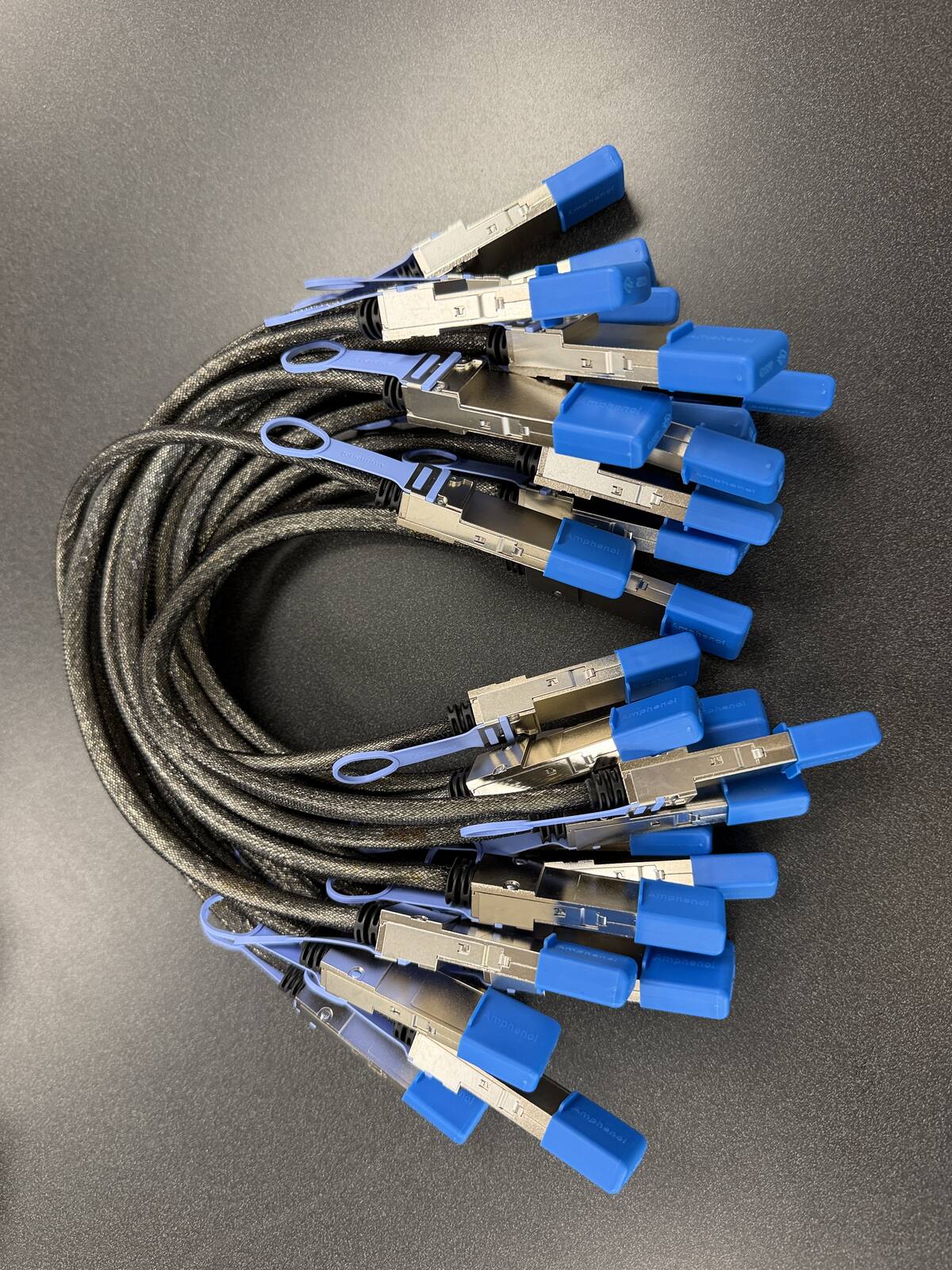
To cluster two Acer Veriton GN100 units you need one cable: an Acer-compatible DAC, a 0.5m QSFP112 400G passive DAC, plugged into the ConnectX-7 QSFP112 port on each unit, Port 0 to Port 0. It is built to the NVIDIA-listed Amphenol NJAAKK0006 / Luxshare LMTQF022-SD-R spec, sold here as the Amphenol NJAAKR-0006 (not the NJAAKK-N911 part number), in stock at petronellatech.com for $159 with free US shipping, shipping in 1 to 3 business days. Three units need three cables (the 3-pack ring kit is $435); NJAAKK-N911 vs NJAAKK0006: the part numbers decoded.
Outside the US? Checkout ships to US addresses only. Request a quote and we will reply with shipping options.
Read the Cable FAQTo cluster two Acer Veriton GN100 AI mini workstations you need one 0.5m QSFP112 400G passive DAC cable in the QSFP112 port on each unit. The Veriton GN100 packs NVIDIA's GB10 Grace Blackwell superchip into a compact, value-priced desktop, and it carries the same ConnectX-7 NIC as the DGX Spark, so it takes the exact cable NVIDIA approves in its Spark Stacking documentation (Amphenol NJAAKK0006 / Luxshare LMTQF022-SD-R spec). Petronella Technology Group, Inc. sells it at $159 with free US shipping, in stock, shipping in 1 to 3 business days. Prices and stock at other sellers change week to week, so compare ship dates as well as prices before you order.
Why buy this cable here instead of a generic compatible cable?
Is it a genuine Amphenol part? Yes. Each cable is factory sealed and jacket-stamped Amphenol AHSP P/N NJAAKR-0006, a 0.5m QSFP112 400G passive DAC built to the same NVIDIA Spark Stacking spec as the NJAAKK0006 / LMTQF022-SD-R references (not the same part number). The bag label is visible in the photos below.
Has it been tested in a GB10 cluster? We measured 196 Gb/s across a single 0.5m cable in our own GB10 cluster work, and the results are public in our free GB10 cluster guide on GitHub.
How fast does it arrive, and what if I change my mind? It is in stock in the US and ships in 1 to 3 business days with free US shipping. You can cancel any time before it ships for a refund less the payment processing fee (see our terms).
The Veriton GN100 is Acer's entry into the GB10 class: the NVIDIA GB10 Grace Blackwell Superchip with 20 Arm cores, 128 GB of LPDDR5X unified memory, a 1 TB or 4 TB self-encrypting M.2 NVMe drive, and NVIDIA DGX OS preinstalled, all in a 150 x 150 x 50.5 mm chassis that weighs under 1.5 kg. Acer announced North American pricing from $3,999 at launch in September 2025, which made the GN100 the natural first pair of nodes for a lot of small teams. The moment a second GN100 arrives, the only missing part is this cable. Acer's own guidance says to connect two units directly with compatible QSFP cables over the onboard NVIDIA ConnectX-7 NIC, and this page covers how to do that on the GN100 specifically: where the ports are, how to route a 0.5 m DAC between two stacked units, what to check on first boot, and which pack to order.
| Cable | 0.5m QSFP112 400G passive direct-attach copper (DAC) |
| Built to | NVIDIA-approved Amphenol NJAAKK0006 / Luxshare LMTQF022-SD-R reference spec (retail name: NVIDIA DGX Spark Stacking DAC Cable, QSFP/CX7) |
| Fits | Both QSFP112 ports on the Acer Veriton GN100 ConnectX-7 NIC |
| Platform | NVIDIA GB10 Grace Blackwell, 128 GB LPDDR5X, 1 TB or 4 TB self-encrypting M.2 NVMe, NVIDIA DGX OS |
| Link speed | About 200 Gb/s per port (2x100G), 185 to 190 Gb/s measured, Ethernet with RoCE |
| For two GN100 units | One cable |
| For a three-node ring | Three cables (switchless, each box uses both ports) |
| Price | $159, free US shipping (in stock, ships in 1 to 3 business days) |
| Multipacks | 2-pack $299, 3-pack ring kit $435 (the three cables a switchless three-node ring needs), free US shipping, US addresses only |
| Works with | NVIDIA DGX Spark, Dell Pro Max GB10, ASUS Ascent GX10, HP ZGX Nano, Lenovo ThinkStation PGX, MSI EdgeXpert, Gigabyte AI TOP ATOM, Acer Veriton GN100; brands can be mixed in one cluster |
| Returns | Cancel free before it ships; after delivery, RMA within 30 days (15% restocking fee and $20 return shipping and handling fee) |
Where the QSFP112 ports sit on the Acer Veriton GN100
Acer puts all of the GN100's I/O on the rear panel. Acer's launch materials list four USB 3.2 Type-C ports, an HDMI 2.1b output, an RJ-45 Ethernet connector, and the NVIDIA ConnectX-7 NIC, plus a Kensington lock slot on the chassis. The ConnectX-7 is what exposes the two QSFP112 cages you plug this cable into. They are the two wide rectangular openings on the back of the unit, visibly larger than the USB-C ports, and they are the only ports on the machine that accept a QSFP module or DAC. There are no QSFP ports on the front, and the front of the GN100 is vent area, not I/O.
NVIDIA's own three-node playbook names the two cages by position: Port 0 is the ConnectX-7 port next to the RJ-45 Ethernet jack, and Port 1 is the one farther from it. Acer ships the GN100 with NVIDIA DGX OS, so the same convention applies when you read interface names on this machine. For a two-node link it does not matter which of the two you pick as long as you use the same port on both units. NVIDIA's two-node guide says to connect matching ports, and its switch guide says to keep the same physical port across every node so the interface names line up. Pick Port 0 on both GN100s, label it, and leave Port 1 empty for a future third node.
Cable dressing between two stacked GN100 units
Acer describes the GN100 as stackable, and two stacked units are the layout most buyers end up with. With one unit on top of the other, the two rear panels sit about 50 mm apart vertically, and the 0.5 m cable has far more length than that gap needs. Do not try to use up the slack by looping it tightly. A passive QSFP112 DAC is a bundle of twinax pairs inside a jacket, and the pairs are what carry a 200 Gb/s signal cleanly; a hard kink or a bend tighter than the cable's stated minimum bend radius degrades the link and can cause errors that show up as a port that flaps or negotiates below full speed. Route the cable straight out of the lower unit's cage, let it form one relaxed loop behind the stack, and bring it straight into the upper unit's cage. Leave a few centimeters of straight run at each connector so the latch is not under sideways tension.
Keep the pull tab accessible. The Amphenol-spec cable releases by pulling the tab, not by pulling the cable, and on a stacked pair the top unit's tab is easy to reach while the bottom unit's tab can end up behind the power cord. Plug the DAC in before the 240 W USB-C power lead on the lower unit so the tab stays clear, and dress the HDMI and USB-C cables to the sides rather than across the QSFP cages. A cable that has been bent past its minimum bend radius is not returnable under our RMA terms, which is another reason to keep the loop generous.
Side by side, rack shelf, and desk placement
Side by side on a desk works just as well. The two rear panels are then 150 mm apart plus whatever gap you leave, and a 0.5 m cable spans that with room for one gentle loop. If you put two GN100s on a rack shelf, keep them within about 300 mm of each other so the cable never runs taut across the shelf, and do not route it through a shelf lip or cable ring tighter than the cable's own curve. Longer runs and split placements are not what the reference spec was written for; NVIDIA's approved parts are 0.5 m for a reason, which is that a passive DAC at this speed is a short-reach part. If your GN100s need to live more than a desk apart, plan the layout around the cable rather than the other way round, or call (919) 348-4912 and we will talk it through before you order anything.
Acer Veriton GN100 configurations and what changes for clustering
Every GN100 configuration uses the same NVIDIA GB10 Grace Blackwell Superchip, the same 128 GB of LPDDR5X unified memory, and the same ConnectX-7 NIC. Acer's spec sheet lists the memory as 8 x 16 GB LPDDR5X, and there is no larger memory option; 128 GB is both the standard and the maximum. What varies by SKU is the drive. Acer's United States lineup pairs the 4 TB self-encrypting M.2 NVMe drive with the VGN100-UD11 (Acer part DT.R6LAA.001), and Acer also lists a 1 TB configuration. As of September 2026 Acer's US store listed the 4 TB VGN100-UD11 at $4,699.99. Both drive sizes come with NVIDIA DGX OS preinstalled, Wi-Fi 7 and Bluetooth 5.4, and Acer's package contents are the workstation, a 240 W USB-C adapter, and a power cord. No QSFP cable is in the box.
| Item | Acer Veriton GN100 | NVIDIA DGX Spark Founders Edition | Matters for clustering? |
|---|---|---|---|
| Superchip | NVIDIA GB10 Grace Blackwell, 20 Arm cores | Same GB10 | No difference |
| Memory | 128 GB LPDDR5X (8 x 16 GB), no other option | 128 GB LPDDR5x | Same pool per node |
| Storage | 1 TB or 4 TB self-encrypting M.2 NVMe | 4 TB NVMe | No; weights load once per node |
| Cluster NIC | NVIDIA ConnectX-7, two QSFP112 ports | Same ConnectX-7, two QSFP ports | Identical, same cable |
| Chassis | 150 x 150 x 50.5 mm, under 1.5 kg, stackable, Kensington slot | 150 x 150 x 50.5 mm, 1.2 kg | Same footprint, stacks together |
| Power | 240 W USB-C adapter | 240 W external supply | No |
| OS | NVIDIA DGX OS, plus Acer Sense Pro management | NVIDIA DGX OS | Same NVIDIA playbooks apply |
The point of that table is that nothing Acer changed touches the cluster link. Storage size affects how many model checkpoints you can keep locally, not how two nodes talk. The Kensington slot and Acer Sense Pro are conveniences. The one figure that does govern clustering is shared by every GB10 box: local memory bandwidth of 273 GB/s against a cluster link of about 200 Gb/s per port, which is roughly 11 times slower. That is why a second GN100 gives you capacity for a bigger model, not a faster small one. Acer's own numbers make the same point in model terms: two GN100s reach models up to 405 billion parameters, and four through a switch reach about 700 billion. Our explainer on what 400G really means for a GB10 cluster walks through the math, and our LLM benchmark leaderboards show what single-node GB10-class throughput looks like before you decide whether a second node is the right spend.
If you are still choosing between the GN100 and NVIDIA's own unit, our DGX Spark hardware page covers the Founders Edition, and the NVIDIA DGX lineup overview puts the GB10 desktops in context with the rack-scale systems. Whichever you buy, the cable on this page is the one that links them.
Setting up the cluster link on an Acer Veriton GN100
Acer ships the GN100 with NVIDIA DGX OS and the NVIDIA AI software stack preinstalled, so the setup follows NVIDIA's DGX Spark clustering playbooks without an Acer-specific fork. The steps below are the standard NVIDIA procedure with notes on what you will see on the GN100. Everything marked as verified comes from Acer's published materials or NVIDIA's documentation, linked in the Sources list at the end of this page; anything else is generic Linux networking that is correct on any DGX OS host.
First boot, before you plug in the DAC
Power each GN100 through its 240 W USB-C adapter, connect the RJ-45 port or Wi-Fi 7 for normal network access, and complete the DGX OS first-boot flow on both units. Apply updates before you start on the cluster link, because NVIDIA ships networking fixes through the DGX OS update channel and the playbooks assume a current image. Give both units hostnames you will recognize, for example gn100-a and gn100-b, and create the same non-root user on each. NVIDIA's two-node playbook uses a shared username across nodes and passwordless SSH between them, so set that up now: generate a key on the first unit, then copy it to the second with ssh-copy-id. Acer Sense Pro, Acer's system monitor, is not involved in any of this; it is useful for watching thermals and memory once the cluster is running.
Plug in and verify the ConnectX-7 link
Seat one end of the cable in Port 0 on each GN100 until the latch clicks. Both units can stay powered; the link comes up on its own. Then run NVIDIA's interface mapping tool on either unit:
ibdev2netdev
ip link show
On DGX OS each physical QSFP port appears as two logical Ethernet interfaces plus a matching RDMA device, which is why you will see names such as enp1s0f0np0 and enP2p1s0f0np0 for Port 0, and enp1s0f1np1 and enP2p1s0f1np1 for Port 1. After the cable is in, ibdev2netdev marks the connected port's interfaces as Up. If every interface still shows Down, reseat the cable at both ends; a DAC that is one millimeter short of the latch will sit in the cage and never link. Confirm the negotiated speed on the interface you plan to use:
sudo ethtool enp1s0f0np0 | grep Speed
ibstat
NVIDIA's switch playbook expects Speed: 200000Mb/s here. That number is correct even though the cable is a 400G part, because the port on the GB10 is capped at 200 Gb/s (2x100G over PCIe Gen5 x4) and NVIDIA's documentation says a faster cable offers no benefit. ibstat shows the same port as an RDMA device; look for an active state and a 200 Gb/s rate. Real-world throughput on this link measures 185 to 190 Gb/s.
Addresses, MTU, and RoCE
Assign a private subnet to the link on both units. NVIDIA's two-node playbook uses a netplan file, and the command-line equivalent for a quick test is:
# GN100 A
sudo ip addr add 192.168.100.10/24 dev enp1s0f0np0
sudo ip link set enp1s0f0np0 up

# GN100 B
sudo ip addr add 192.168.100.11/24 dev enp1s0f0np0
sudo ip link set enp1s0f0np0 up

# from A
ping -c 3 192.168.100.11
Use netplan to make it persistent; the playbook's 40-cx7.yaml example shows the layout, and sudo netplan apply reloads it. NVIDIA's playbooks leave the MTU at the DGX OS default. If you raise it to jumbo frames for a storage or RDMA workload, set both ends identically with sudo ip link set dev enp1s0f0np0 mtu 9000 and confirm with ip link show enp1s0f0np0; a mismatched MTU passes a ping and then fails on large transfers, which is a confusing symptom to chase. The link is Ethernet carrying RoCE, not InfiniBand, so there is no subnet manager to run. NCCL and UCX find the RDMA device automatically, and NVIDIA's multi-node playbooks pin them to the cluster interface with NCCL_SOCKET_IFNAME and UCX_NET_DEVICES so traffic never falls back to the RJ-45 port. Once ping works across the link and ssh gn100-b hostname returns without a password prompt, the GN100 pair is ready for NVIDIA's NCCL test and the multi-node inference playbooks.
If any of this looks unfamiliar, the DGX Spark stacking cable guide covers the unboxing-to-cluster walkthrough in more depth, and our engineers at Petronella Technology Group, Inc. cluster GB10 units for clients as part of our on-premises AI deployment work.
Need a PO or invoice for 5+ cables? Send the quantity and ship-to address through our cable quote form or call (919) 348-4912, and we send a Stripe invoice for your PO. Payment is due in full before the cables ship.
Outside the US? Checkout ships to US addresses only. Request a quote and we will reply with shipping options.
Mixing the Veriton GN100 with other GB10 workstations, and going past three nodes
Because every GB10 workstation carries the same ConnectX-7 NIC with the same two QSFP112 ports, an Acer Veriton GN100 links to any other GB10 box over this same cable. A GN100 next to a DGX Spark Founders Edition, an ASUS Ascent GX10, a Dell Pro Max with GB10, an MSI EdgeXpert, an HP ZGX Nano, a Lenovo ThinkStation PGX, or a Gigabyte AI TOP ATOM negotiates the same 200 Gb/s Ethernet link, runs the same DGX OS playbooks, and pools memory the same way. The only practical difference in a mixed pair is physical: the other OEM's QSFP cages may sit in a different spot on its rear panel, so check that machine's page for its layout before you decide which unit goes on top of the stack.
The one thing to keep straight in a mixed cluster is that each node's local memory is still 128 GB and each link is still about 200 Gb/s. A GN100 does not get faster by being paired with a different brand, and a heavier storage configuration on one side does not change the interconnect. Treat every GB10 box as an interchangeable node.
Two nodes, three nodes, then a switch
Acer's published guidance covers two cases: two GN100 units connected directly with QSFP cables, and up to four GN100 units connected through a RoCE 200 GbE switch. NVIDIA's DGX Spark playbooks add a middle case, the three-node switchless ring, which uses both QSFP ports on every box and three cables: Port 0 on node 1 to Port 1 on node 2, Port 0 on node 2 to Port 1 on node 3, and Port 0 on node 3 back to Port 1 on node 1. The GN100 has the identical two-port ConnectX-7, so the ring works on it, but understand that it is NVIDIA's topology rather than one Acer documents on its own pages, and that with three GN100s in a ring every port is in use and there is nowhere to add a fourth without re-cabling.
Four or more GN100s need a switch, full stop, because each unit has only two ports. NVIDIA's switch playbook calls for a QSFP switch with at least four 200 Gb/s-capable ports, all in one layer-2 domain, with one cable per node from the same physical port on each. Acer's own wording is a RoCE 200 GbE switch, which is the same requirement. At that point the cable on this page is still the right part between each GN100 and the switch, provided the switch port accepts a QSFP112 DAC; check your switch's cable compatibility list before buying, and if the switch is not yet chosen, ask for a bulk cable and cluster quote and we will size the whole thing with you. The hub page's section on planning the switch before the cables explains why the switch decision comes first.
Which pack to buy for an Acer Veriton GN100 cluster
The GN100 buyer is usually a small team, a university lab, or an individual developer who bought two units on price and now wants them to work as one. That maps cleanly onto three cases.
- Single cable, $159: two GN100 units, one direct link. This is the majority order. It leaves Port 1 free on both boxes.
- 2-Pack, $299 ($149.50 per cable, save $19): two GN100 pairs in one lab, or one pair plus a spare on the shelf. A spare matters more than it sounds; a bent or latch-damaged DAC is not repairable, and a spare on the shelf means a damaged cable costs you minutes, not a week of waiting.
- 3-Pack Ring Kit, $435 ($145 per cable, save $42): three GN100 units in NVIDIA's switchless ring. Three cables is the exact count; there is no reason to buy four for a ring.
What is in the box and how fast it ships
Each order is one 0.5 m QSFP112 400G passive DAC built to the NVIDIA-approved Amphenol NJAAKK0006 / Luxshare LMTQF022-SD-R reference spec, the part NVIDIA sells under the retail name NVIDIA DGX Spark Stacking DAC Cable, QSFP/CX7. Nothing else is required; the cable is passive, so there is no transceiver, no firmware, and no driver to install on the GN100. Cables are in stock and ship in 1 to 3 business days with a tracking number emailed when the label prints. Free shipping applies to US addresses only. Outside the US we can still quote it, but carrier costs vary by country, so call (919) 348-4912 or use our contact page for a landed price before you order.
Returns
You can cancel any time before your order ships for a refund less the payment processing fee. Once it has shipped, a return needs a Return Merchandise Authorization (RMA) number requested within 30 days of delivery. You pay return shipping and handling, and the refund is the purchase price less a 15% restocking fee and a flat $20 return shipping and handling fee, which covers the outbound shipping we paid, including where shipping was free at checkout. Cables that have been cut, modified, bent past their minimum bend radius, or installed are not returnable. The full wording is in our terms of use. Purchase orders from schools and government buyers are welcome; the hub page's in-stock announcement and bundle post lists the PO process and the multipack pricing in one place.
Why buy it here instead of chasing a retail listing
| Source | Price | Availability | Shipping |
|---|---|---|---|
| Petronella Technology Group, Inc. | $159 | In stock, ships in 1 to 3 business days | Free to US addresses |
| Retail listings for the same spec | Varies by seller and week | Varies by listing | Varies |
| NVIDIA marketplace | Listed | Stock varies | Not applicable when unavailable |
We sell the cable because we build and support GB10 clusters for clients and got tired of waiting on it ourselves. The same engineers who answer (919) 348-4912 have seated this exact part in GB10 workstations, which is not something a marketplace listing can say.
Acer Veriton GN100 cluster cable FAQ
What cable clusters two Acer Veriton GN100 units?
Can the Acer Veriton GN100 cluster with a DGX Spark or another GB10 box?
How many Veriton GN100 units can I cluster without a switch?
What if I need to cancel or return my order?
Is the Acer Veriton GN100 cluster cable in stock?
Which QSFP port on the Veriton GN100 should I use for a two-node link?
Does the Acer Veriton GN100 come with a QSFP cable in the box?
Does the 1 TB or 4 TB Veriton GN100 configuration change anything about clustering?
Will clustering two Veriton GN100 units make inference faster?
Does the Acer Veriton GN100 need any driver or firmware for this cable?
Sources
- Acer press release, September 3, 2025: Acer Unveils the Veriton GN100 AI Mini Workstation Built on the NVIDIA GB10 Superchip: https://news.acer.com/acer-unveils-the-veriton-gn100-ai-mini-workstation-built-on-the-nvidia-gb10-superchip
- Acer press release, April 9, 2026: Acer Veriton GN100 to Power The Spark Hack Series (four-system switch scaling, Acer Sense Pro): https://news.acer.com/acer-veriton-gn100-to-power-the-spark-hack-series-new-york-with-new-capabilities
- Acer Veriton GN100 AI Mini Workstation product page (ConnectX-7 clustering guidance, storage options, stackable design): https://www.acer.com/us-en/desktops-and-all-in-ones/veriton-workstations/veriton-gn100-ai-mini-workstation
- Acer Store listing, Veriton VGN100-UD11 (package contents, 240 W adapter, dimensions, price as of September 2026): https://store.acer.com/en-us/veriton-ai-mini-workstation-vgn100-ud11
- NVIDIA DGX Spark documentation: Spark Stacking (approved cables, 200 Gb/s port limit): https://docs.nvidia.com/dgx/dgx-spark/spark-clustering.html
- NVIDIA DGX Spark documentation: hardware overview (rear panel, dimensions, 273 GB/s): https://docs.nvidia.com/dgx/dgx-spark/hardware.html
- NVIDIA DGX Spark playbook: Connect Two Sparks: https://github.com/NVIDIA/dgx-spark-playbooks/blob/main/nvidia/connect-two-sparks/README.md
- NVIDIA DGX Spark playbook: Connect Three DGX Spark in a Ring Topology: https://github.com/NVIDIA/dgx-spark-playbooks/blob/main/nvidia/connect-three-sparks/README.md
- NVIDIA DGX Spark playbook: Connect Multiple DGX Spark through a Switch: https://github.com/NVIDIA/dgx-spark-playbooks/blob/main/nvidia/multi-sparks-through-switch/README.md