
ASUS Ascent GX10 Cluster Cable: 0.5m QSFP112 400G DAC
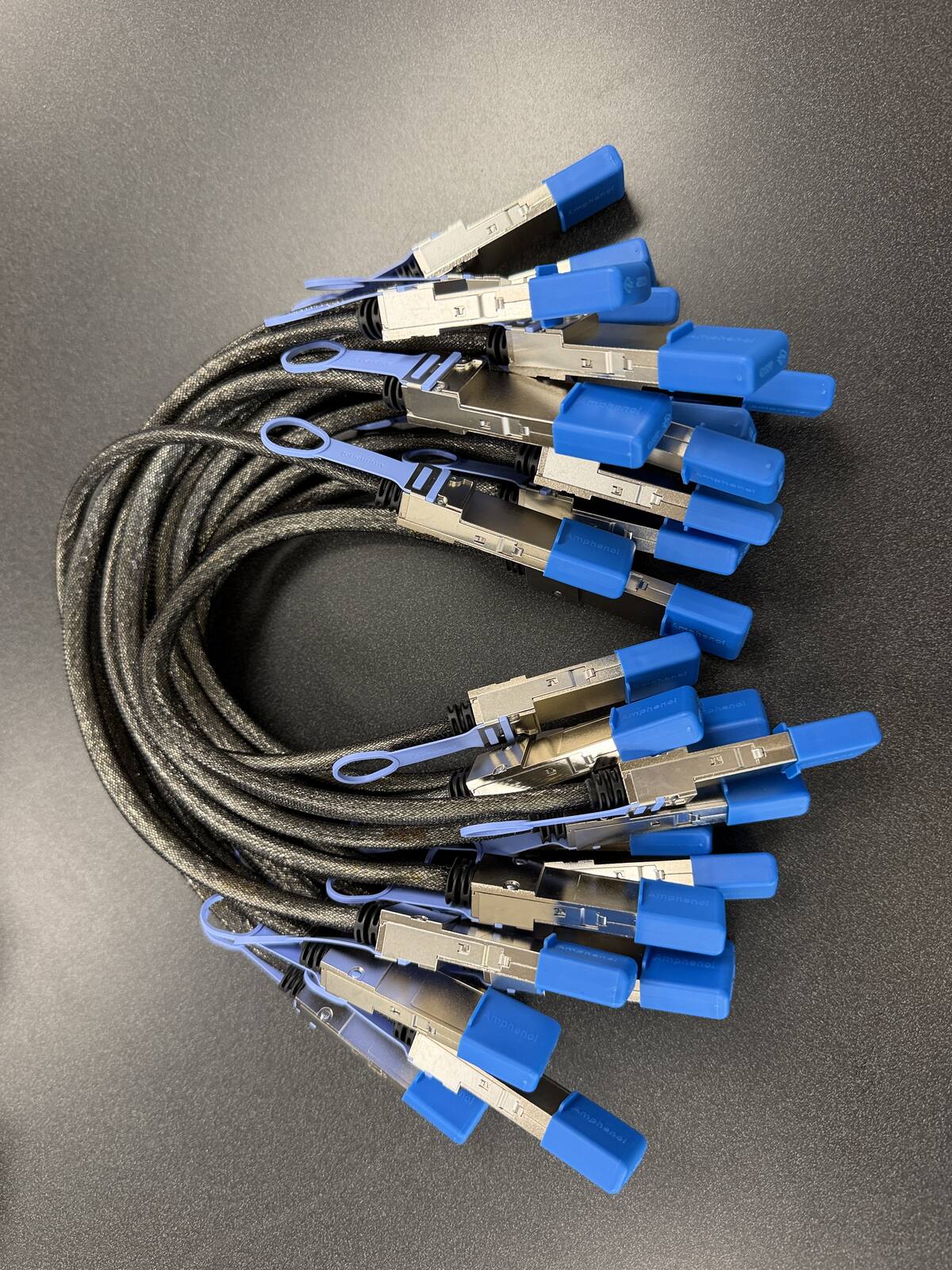
The ASUS Ascent GX10 cluster cable is a 0.5m QSFP112 400G passive DAC, Amphenol NJAAKR-0006, in stock at petronellatech.com for $159 with free US shipping, shipping in 1 to 3 business days. The GX10 shares the DGX Spark GB10 platform and ConnectX-7 ports, so one cable links two units and a three-unit ring needs three. Each end is a ConnectX-7 QSFP112 connector; the cable is an alternative to ASUS's own QSFP cable for the Ascent GX10.
Outside the US? Checkout ships to US addresses only. Request a quote and we will reply with shipping options.
Read the Cable FAQTo cluster two ASUS Ascent GX10 workstations you need one 0.5m QSFP112 400G passive DAC cable in the QSFP112 port on each unit. The GX10 is built on NVIDIA's GB10 Grace Blackwell platform with the same ConnectX-7 NIC as the DGX Spark, so it takes the exact cable NVIDIA approves in its Spark Stacking documentation (Amphenol NJAAKK0006 / Luxshare LMTQF022-SD-R spec). Petronella Technology Group, Inc. sells it at $159 with free US shipping, in stock, shipping in 1 to 3 business days. Prices and stock at other sellers change week to week, so compare ship dates as well as prices before you order.
Why buy this cable here instead of a generic compatible cable?
Is it a genuine Amphenol part? Yes. Each cable is factory sealed and jacket-stamped Amphenol AHSP P/N NJAAKR-0006, a 0.5m QSFP112 400G passive DAC built to the same NVIDIA Spark Stacking spec as the NJAAKK0006 / LMTQF022-SD-R references (not the same part number). The bag label is visible in the photos below.
Has it been tested in a GB10 cluster? We measured 196 Gb/s across a single 0.5m cable in our own GB10 cluster work, and the results are public in our free GB10 cluster guide on GitHub.
How fast does it arrive, and what if I change my mind? It is in stock in the US and ships in 1 to 3 business days with free US shipping. You can cancel any time before it ships for a refund less the payment processing fee (see our terms).
The exact cable your ASUS Ascent GX10 needs
| Cable | 0.5m QSFP112 400G passive direct-attach copper (DAC) |
| Approved spec | Amphenol NJAAKK0006 / Luxshare LMTQF022-SD-R (NVIDIA Spark Stacking docs) |
| Fits | Both QSFP ports on the ASUS Ascent GX10's ConnectX-7 SmartNIC (rear panel, beside the 10G LAN jack) |
| Host machine | ASUS Ascent GX10: NVIDIA GB10 Grace Blackwell Superchip, 128 GB LPDDR5x unified memory, 1TB / 2TB / 4TB M.2 2242 NVMe, NVIDIA DGX OS |
| Link rate | About 200 Gb/s per port (Ethernet with RoCE); the cable is 400G-rated for headroom |
| For two GX10 units | One cable |
| For a three-node ring | Three cables (switchless, each GX10 uses both ports) |
| In the GX10 box | AC adapter, power cord, user manual, warranty card. No QSFP cable ships with the machine. |
| Price | $159, free US shipping (in stock, ships in 1 to 3 business days) |
| Multipacks | 2-pack $299, 3-pack ring kit $435 (the three cables a switchless three-node ring needs), free US shipping, US addresses only |
| Works with | NVIDIA DGX Spark, Dell Pro Max GB10, ASUS Ascent GX10, HP ZGX Nano, Lenovo ThinkStation PGX, MSI EdgeXpert, Gigabyte AI TOP ATOM, Acer Veriton GN100; brands can be mixed in one cluster |
| Returns | Cancel free before it ships; after delivery, RMA within 30 days (15% restocking fee and $20 return shipping and handling fee) |
Where the two QSFP ports sit on the ASUS Ascent GX10
The Ascent GX10 is a 150 x 150 x 51 mm square (5.91 x 5.91 x 2.01 inches) that weighs 1.48 kg (3.26 lb), finished in what ASUS calls Stellar Grey. The only control on the front is the power button. Everything else is on the rear panel, and ASUS's user guide numbers the rear callouts in this order: Kensington security slot, a USB 20Gbps Type-C port that doubles as the 180W power input, the remaining USB Type-C ports with DisplayPort output, the HDMI port, the LAN port, the ConnectX-7 interface with its QSFP ports, and finally the air vents. So when you turn the machine around, look for the two QSFP cages next to the 10G RJ45 jack, at the vent end of the panel. They are the largest openings on the back and the only ones that accept the cluster cable. The USB-C ports and the RJ45 jack cannot carry the node-to-node link; the ConnectX-7 pair is the whole reason the GX10 clusters at all.
The two ports are not interchangeable in NVIDIA's playbooks, so identify them before you cable anything. NVIDIA's DGX Spark clustering guide calls the QSFP port closest to the Ethernet port "port 0" (the left port when viewed from the rear on the Founders Edition), and ASUS's own four-node guide refers to the CX7 port "further from the ethernet port" as the second port. On the GX10 that gives you a simple rule: the QSFP cage beside the RJ45 jack is port 0, and the cage farther from it is port 1. In DGX OS, port 0 appears as enp1s0f0np0 (with a twin enP2p1s0f0np0) and port 1 appears as enp1s0f1np1 (twin enP2p1s0f1np1). ASUS's two-unit and four-unit procedures both use port 1, so for a plain two-node link, plug the cable into the port farther from the RJ45 jack on both machines and you will match ASUS's examples line for line.
Seating the cable and dressing the loop
NVIDIA's guide has you insert each end with the pull tab facing upward on the DGX Spark; on the GX10, let the cage keying decide, because the QSFP connector only seats one way and will not go in upside down. Push until the latch clicks. To remove it, pull the tab straight back to release the latch and slide the connector out. Never lever the cable body sideways to free a stuck connector, because the cage on the NIC is the part that bends first.
A half meter is far more reach than two GX10 units need. Stack one on the other and the two rear panels are only about 51 mm apart, which leaves roughly 40 cm of copper to dress. Place them side by side and the ports are still well inside the cable's reach. NVIDIA's approved parts are 30 AWG and 32 AWG twinax, which is noticeably stiffer than an Ethernet patch lead, so treat the slack the way you would treat a fiber jumper: form one relaxed loop beside the chassis rather than a tight U-turn at the connector boot, keep the loop supported on the desk instead of hanging its weight off the QSFP cage, and never crease or kink the jacket. Our return terms exclude cables bent past their minimum bend radius, and the GX10's cage does not appreciate the strain either. The one placement rule that is specific to this chassis is the vent grille that sits right next to the QSFP pair: route the loop down and away from the panel so it never lies across those rear vents.
Stacking, side-by-side, and shelf placement for the GX10 form factor
ASUS's guidance for the GX10 is to place it on a stable, flat surface with adequate ventilation and to keep the air vents unobstructed. The chassis moves air with three fans and a dual vapor chamber, and it exhausts through the rear vents beside the ports. Two GX10 units stacked directly on top of each other is the most common two-node layout, and it works well as long as the rear faces stay flush so both units breathe freely and the cable loop hangs to the side rather than across either machine's vents. Side by side on a desk is just as good and keeps each unit's top surface clear. On a rack shelf, three GX10 units in a row occupy about 450 mm of width, and every port-to-port run in a three-node ring stays inside the 0.5m cable. Do not split a ring across two shelves that are far apart; the passive DAC does not stretch, and a longer cable is a different part. If your layout separates the machines by more than half a meter, call 919-348-4912 with the real port-to-port distance and we will quote the correct longer build.
ASUS Ascent GX10 configurations: what changes and what does not
ASUS sells the Ascent GX10 in three configurations, and the only thing that differs between them is the SSD. ASUS's press release and US spec page list a 1TB M.2 2242 NVMe PCIe 4.0 x4 drive, a 2TB M.2 2242 NVMe PCIe 4.0 x4 drive, and a 4TB M.2 2242 NVMe PCIe 5.0 x4 drive. ASUS's GX10 FAQ adds that the 1TB and 2TB drives are TCG Pyrite while the 4TB drive is TCG Opal, and that the chassis has a single M.2 slot. ASUS does not support customer hardware upgrades on the GX10; its FAQ states that damage from a customer-performed SSD replacement is treated as customer-induced damage and is not covered under warranty. The US ASUS eShop lists the 1TB model as part number 90MS0371-M000A0 and the 4TB model as 90MS0371-M000H0, both with a one-year manufacturer's limited warranty. ASUS announced availability on October 15, 2025.
Everything else is identical across the three SKUs. Each GX10 carries the NVIDIA GB10 Grace Blackwell Superchip with a 20-core Arm CPU (ten Cortex-X925 and ten Cortex-A725 cores) and an integrated Blackwell GPU rated at up to 1 petaFLOP of FP4 AI performance, 128 GB of LPDDR5x unified system memory, one NVIDIA ConnectX-7 SmartNIC, a 10G Ethernet port, Wi-Fi 7 (2x2) with Bluetooth 5.4, three USB 3.2 Gen 2x2 Type-C ports at 20Gbps with DisplayPort 2.1 alternate mode, one USB Type-C port that takes 180W power delivery in (EPR PD 3.1), an HDMI 2.1 port, and a Kensington lock slot. The supplied adapter is rated at 240W, which ASUS breaks down as 140W for the GB10 SoC and 100W for the rest of the system. The machine ships with NVIDIA DGX OS, an Ubuntu-based image, and ASUS states that DGX OS is currently the only tested and recommended operating system for it.
GX10 versus the DGX Spark Founders Edition
For clustering purposes the ASUS Ascent GX10 and the NVIDIA DGX Spark desktop AI system are the same machine in different enclosures. Both run the GB10 superchip, both carry 128 GB of unified memory, both expose the ConnectX-7 NIC through two QSFP ports, and both boot DGX OS. Where the GX10 differs is in the things that surround the silicon: the ASUS chassis and cooling design, the three storage tiers ASUS offers, the ASUS warranty and support channel, and the rear-panel layout described above. None of those touch the interconnect. NVIDIA's Spark Stacking documentation names the Amphenol and Luxshare parts for the Founders Edition, and the GX10 uses the identical NIC and ports, so that same cable is the right one here.
What matters for clustering, and what does not
Whether you bought the 1TB, 2TB, or 4TB GX10 makes no difference to the cluster link, and neither does Pyrite versus Opal, Wi-Fi, or which USB-C port drives your monitor. The three things that matter are the ConnectX-7 NIC, its two QSFP ports, and DGX OS, and every GX10 has all three. What clustering buys you is capacity. ASUS's own description of a dual-GX10 setup is up to 256 GB of unified memory and 8TB of storage across the pair, which is what lets a model that will not fit in one 128 GB machine load across two. What it does not buy you is raw speed: each GB10 reads its local memory at 273 GB/s, while the node-to-node link negotiates at about 200 Gb/s, roughly 25 GB/s, so the interconnect is about eleven times slower than local memory. Our explainer on what the GB10's 400G port actually delivers walks through those numbers. The short version: cluster two GX10 units to run a bigger model, not to run the same model faster.
Setting up a two-node ASUS Ascent GX10 cluster
The GX10 arrives with DGX OS preinstalled, so first boot is the standard Ubuntu-style setup: create your user, connect each unit to the internet over the 10G LAN port or Wi-Fi 7, and let both machines take their DGX OS updates before you touch the cluster link. Bring both units to the same OS and driver level; a version mismatch between nodes is the most common reason a link that looks healthy at the Ethernet layer misbehaves under NCCL. Internet access is also a hard prerequisite for ASUS's procedure, because it downloads NVIDIA's network configuration file directly from GitHub.
ASUS publishes an official "How to Connect Two ASUS Ascent GX10" support article, and its procedure is the NVIDIA two-node playbook applied to the GX10. Verified from that article, the steps are: connect the QSFP cable between the two units, then run the following on each GX10.
sudo wget -O /etc/netplan/40-cx7.yaml https://github.com/NVIDIA/dgx-spark-playbooks/raw/main/nvidia/connect-two-sparks/assets/cx7-netplan.yaml
sudo chmod 600 /etc/netplan/40-cx7.yaml
sudo netplan apply
ASUS then has you confirm each unit's address under Settings, Network, Ethernet (enp1s0f1np1), IPv4 Address, and ping the other node from each side. Two details from ASUS's article are worth noting. First, the interface it reads is enp1s0f1np1, which is port 1, the QSFP cage farther from the RJ45 jack, so cable that port on both units. Second, the addresses in ASUS's example are 169.254.x.x link-local addresses that the netplan file hands out automatically; you do not have to choose a subnet for a plain two-node link. NVIDIA's own README for the same playbook shows the alternative of static addresses on the 192.168.100.x and 192.168.101.x subnets and repeats the one rule that matters: use the same physical port on each device, or NCCL tests will misbehave.
Verifying the ConnectX-7 link and checking its speed
Each physical QSFP port on the GX10 shows up in DGX OS as two logical Ethernet interfaces and two RoCE devices. Port 0 is enp1s0f0np0 and enP2p1s0f0np0 with RoCE devices rocep1s0f0 and roceP2p1s0f0; port 1 is enp1s0f1np1 and enP2p1s0f1np1 with rocep1s0f1 and roceP2p1s0f1. These names come from NVIDIA's clustering guide and are the same names ASUS uses in its GX10 articles, so they are not something you need to discover. To confirm the link after the cable is seated:
ibdev2netdev
ip link show enp1s0f1np1
sudo ethtool enp1s0f1np1 | grep -i speed
ibstat
ibdev2netdev is the check NVIDIA's playbooks use; the port you cabled should read (Up) on both machines. ip link should show the interface in state UP with a carrier. ethtool reports the negotiated rate, and on a GB10-to-GB10 link you should see a 200 Gb/s class figure rather than 400: the ConnectX-7 in every GB10 workstation negotiates at about 200 Gb/s per port, as 2x100G over PCIe Gen5 x4, with real-world measurements in the 185 to 190 Gb/s range. ibstat works because the CX7 exposes RoCE devices, and it should show the cabled port Active. If the link stays down, reseat both ends until they click, confirm you used the same port on both units, and confirm both units finished their DGX OS updates. There is no cable firmware to suspect; a passive DAC either links or it does not.
MTU and RoCE basics
The GB10 link is Ethernet, not InfiniBand. NCCL and the distributed frameworks on DGX OS move data across it with RDMA over Converged Ethernet, which is why the RoCE devices exist alongside the Ethernet interfaces. NVIDIA's two-node and three-node playbooks leave the MTU at the default and do not set a jumbo frame, and ASUS's GX10 article follows them, so the correct starting point is to change nothing. If you later tune for throughput and raise the MTU, raise it identically on both ends of every link; a mismatched MTU is the classic silent throughput killer on RoCE and shows up as a link that pings fine but crawls under load. The rest of the bring-up, including passwordless SSH between nodes and the NCCL bandwidth test, follows the standard DGX Spark clustering guide linked in the Sources below; NVIDIA's ring playbook ships a spark_cluster_setup script with a --run-nccl-test option that does the verification for you. If you would rather not touch netplan at all, NVIDIA Sync's Cluster Assistant walks a two- to four-node DGX Spark cluster through the same configuration with a guided interface. Budget about fifteen minutes for the whole exercise once the cable is in hand.
Need a PO or invoice for 5+ cables? Send the quantity and ship-to address through our cable quote form or call (919) 348-4912, and we send a Stripe invoice for your PO. Payment is due in full before the cables ship.
Outside the US? Checkout ships to US addresses only. Request a quote and we will reply with shipping options.
Mixing the GX10 with other GB10 machines, and scaling past three
An ASUS Ascent GX10 does not need an ASUS partner. Every GB10 workstation carries the same ConnectX-7 NIC with the same two QSFP ports and boots the same DGX OS, so a GX10 clusters with a DGX Spark Founders Edition or with any OEM build over this one cable. Teams rarely buy all their nodes at once, and the machine in stock this month is often not the brand that was in stock last month. If your second box is a Dell Pro Max with GB10, an HP ZGX Nano G1n, a Lenovo ThinkStation PGX, an MSI EdgeXpert workstation, an Acer Veriton GN100, or a Gigabyte AI TOP ATOM, the link comes up the same way. The interface names are identical across all of them, because they come from the NIC rather than the chassis, so ASUS's two-unit procedure works unchanged on a mixed pair. The only thing that differs between vendors is where the ports physically sit on the back, which is why each of our OEM pages describes its own rear panel. A passive DAC carries no firmware, so adding one changes nothing about either workstation's warranty relationship with its vendor.
Three GX10 units: the switchless ring
Three GX10 units form a full mesh with three cables and no switch, following NVIDIA's "Connect Three DGX Spark in a Ring Topology" playbook. The cabling map from that playbook is exact: Node 1 port 0 to Node 2 port 1, Node 2 port 0 to Node 3 port 1, and Node 3 port 0 to Node 1 port 1. On the GX10, port 0 is the QSFP cage beside the RJ45 jack and port 1 is the one farther from it, so each unit ends up with one cable in each cage. In a ring, all four logical interfaces on every node need an address to form a symmetric cluster; NVIDIA's playbook assigns six /24 subnets across the three machines and its setup script does that work, sets up passwordless SSH, verifies the links, and can run the NCCL bandwidth test. Order the three cables together as the 3-pack ring kit and the ring goes up in one sitting. Three is the switchless ceiling: with two ports per unit, a fourth GX10 cannot be cabled directly to all three others.
Four GX10 units: ASUS's switch guidance
ASUS publishes a separate official article for four units, and its requirements are specific: a QSFP switch with at least four QSFP56-DD ports rated at 200 Gbps or more, one cable from one CX7 port on each GX10 to the switch, and the same CX7 port used on every unit (ASUS's example uses port 1, enp1s0f1np1, and tells you to disregard the port 0 interfaces). Addressing can come from a DHCP server on the switch, from link-local autoconfiguration, or from manually assigned subnets, and ASUS's example verifies the cluster with ssh-copy-id to each node and an mpirun -np 4 job across all four. ASUS's product page states that a maximum of four GX10 units can be clustered together, and NVIDIA Sync's Cluster Assistant also tops out at four DGX Spark devices, so four is the practical ceiling for a small GX10 fleet today. The shopping list for four nodes changes from one cable per link to one cable per node plus the switch itself, and the switch's port type and speed have to match the DACs you already own. Petronella Technology Group, Inc. specs these builds routinely; send your node count through the cluster build quote form on our hub page or call 919-348-4912 and an engineer will map the ports, cables, and switch with you before you commit to any of it. For broader AI infrastructure work around a GX10 fleet, from model selection to deployment, see our AI services and consulting and the on-fleet LLM benchmark results we publish from our own GB10 and larger systems.
Buying guidance for ASUS Ascent GX10 owners
The GX10 does not ship with a stacking cable; ASUS lists only the AC adapter, power cord, user manual, and warranty card in the box. Which of our three options fits depends on how many GX10 units you own or have on order.
Single cable, $159. Two GX10 units, one link. This is the order for a developer with a pair of machines or a lab adding a second GX10 to run models past the 128 GB ceiling. 2-pack, $299 ($149.50 per cable, save $19). Two pairs in different rooms, or one pair plus a spare on the shelf; a spare is cheap insurance against waiting on a replacement. Some two-node owners also run a second cable between the remaining ports of the same pair, which the DGX Spark stacking cable hub covers in more detail. 3-pack ring kit, $435 ($145 per cable, save $42). Three GX10 units in NVIDIA's ring topology, all three links in one order; this is the most common multipack we quote. For four nodes, you need one cable per node plus a switch, so ask for a quote rather than ordering four singles.
Every cable ships in its factory-sealed Amphenol packaging, built to the NVIDIA-approved Amphenol NJAAKK0006 / Luxshare LMTQF022-SD-R spec. There are no transceivers or optics to buy separately; the connector ends of a passive DAC are the transceivers. Orders are in stock and ship in 1 to 3 business days with free shipping to US addresses, and you receive a tracking number by email when the cable ships. We ship only to US addresses at the free rate; outside the US, call 919-348-4912 or use our contact page for a shipping quote before you order. Returns: cancel any time before the cable ships for a refund less the payment processing fee. Once it has shipped, a return needs an RMA within 30 days, you pay return shipping and handling, and the refund is the purchase price less a 15% restocking fee and a flat $20 return shipping and handling fee. Cables that have been cut, modified, bent past their minimum bend radius, or installed are not returnable. If your second GX10 is still on order, order the cable at the same time; it is the cheapest component in the build and the one most likely to hold up an otherwise complete cluster.
Price check: the same NVIDIA-approved spec
| Source | Price | Availability |
|---|---|---|
| Petronella Technology Group, Inc. | $159, free US shipping | In stock, ships in 1 to 3 business days |
| Retail listings for the same spec | Varies by seller and week | Varies by seller |
| NVIDIA marketplace | Listed | Stock varies |
If you are also weighing which GB10 machine to buy next, or a larger system for the jobs a desk-side cluster cannot hold, our NVIDIA DGX systems overview covers the range above the GB10 class. For the cable itself, the two-node question is settled: the GX10 uses the same part as every other GB10 workstation, and it is on our shelf now.
ASUS Ascent GX10 cluster cable FAQ
What cable do I need to cluster two ASUS Ascent GX10 units?
Which QSFP port on the ASUS Ascent GX10 should I use for a two-node link?
Does the ASUS Ascent GX10 come with a cluster cable in the box?
Can I cluster an ASUS Ascent GX10 with a DGX Spark or another OEM GB10 box?
How many ASUS GX10 units can I cluster without a switch?
Does the 1TB, 2TB, or 4TB ASUS GX10 model change which cable I need?
How do I check the link speed between two ASUS GX10 units?
Will clustering two ASUS GX10 units make inference faster?
Is the ASUS GX10 cluster cable in stock, and how fast does it ship?
What if I need to cancel or return my ASUS GX10 cable order?
Sources
- ASUS Ascent GX10 tech specs (US): https://www.asus.com/us/networking-iot-servers/desktop-ai-supercomputer/ultra-small-ai-supercomputers/asus-ascent-gx10/techspec/
- ASUS Ascent GX10 product page (US): https://www.asus.com/us/networking-iot-servers/desktop-ai-supercomputer/ultra-small-ai-supercomputers/asus-ascent-gx10/
- ASUS Ascent GX10 FAQ (OS, storage, upgrades, power): https://www.asus.com/us/support/faq/1056142/
- ASUS: How to Connect Two ASUS Ascent GX10: https://www.asus.com/us/support/faq/1056547/
- ASUS: How to Connect Four ASUS Ascent GX10: https://rog.asus.com/nz/support/faq/1057166/
- ASUS press release, Ascent GX10 availability: https://press.asus.com/news/press-releases/asus-ascent-gx10-ai-supercomputer/
- ASUS eShop US, GX10 1TB (warranty, box contents): https://eshop.asus.com/us/90ms0371-m000a0-asus-ascent-gx10.html
- ASUS Ascent GX10 User Guide, rear view callouts: https://www.manua.ls/asus/ascent-gx10/manual
- NVIDIA DGX Spark: Spark Stacking (approved cables, port identification, interface names): https://docs.nvidia.com/dgx/dgx-spark/spark-clustering.html
- NVIDIA: Connect Two DGX Spark playbook README: https://github.com/NVIDIA/dgx-spark-playbooks/blob/main/nvidia/connect-two-sparks/README.md
- NVIDIA: Connect Three DGX Spark in a Ring Topology: https://build.nvidia.com/spark/connect-three-sparks/three-sparks-ring
- NVIDIA Sync Cluster Assistant: https://docs.nvidia.com/sync/latest/cluster-assistant.html